Updates killing new install

Hello,

Requirements:

I have Searched the forum for my issue and found nothing related or helpful
I have checked the Resources category
I have reviewed the Wiki for relevant information
I have read the the Release Notes and Errata

OpenMandriva Lx version:
snapshot.20250914.4172

Desktop environment (KDE, LXQT…):
KDE Plasma

Description of the issue (screenshots if relevant):
Breaks after update

Relevant informations (hardware involved, software version, logs or output…):
Seeed X86J4125 MiniPC

Info above is a bit sparse since the install is currently broken so I can’t really check it. I’ll preface this by saying I’ve never used an RPM based distro before, figured I’d try OpenMandriva on an appliance PC since I’m looking to get away from Manjaro but I’ve been doing the Linux thing for like 20 years so I’m not really new to it.

I’m slightly confused where I’m going wrong here. I downloaded and installed Rome snapshot.20250914.4172 from the main page. I didn’t notice the SourceForge images until now but I assume they are just a bit older. Anyway it installs fine, seems to work fine. I do a bit of setup then go to update and I run into various issues.

First try: The little update icon in the panel, it downloads packages then just stops, doesn’t install anything, figured maybe something is wrong there so…

Second try: I used Dnfdrake after seeing it on the Wiki. selected distro-sync and it starts doing it’s thing, then the DE dies and it falls back to tty. I figure the update process died but I left it sit for a while anyway, then rebooted. When it comes back up it’s in tty1. I check and it looks like only tty4 is also available but it can’t switch back to tty1 after going to tty4. So reboot, from tty1 I can start sddm and it gets into plasma just fine…

Third try: Now I try it from CLI just as the pinned post suggests, first it complains about systemctl, it appears 2 versions exist, I assume this is where the update died. So I manage to clear the older version. I then tried the CLI update again after a reboot, it does the exact same thing as dnfdrake did, dies shortly after it starts installing packages. Reboot it, start sddm from tty1 and it’s otherwise normal. Doesn’t seem to have the duplicate systemctl installed this time.

Fourth try: This was probably a bad idea, but nothing else was working so.I used the method in the post " Upgrading ROME(rolling) after Nov. 9, 2025 upgrade" the output from rpm -qa | grep sddm was different package versions but I didn’t think much of it. Anyway after rebooting I just get a stale cursor, no tty available so I can’t do much of anything. Now, I did notice some output about it finding a Manjaro install on the eMMC and doing whatever in grub for it. I installed OM and it’s bootloader to a SATA M.2 and set that to the primary boot device. I didn’t even remember there was a manjaro install on the eMMC, I don’t really care about it but not sure if that caused an issue, it hadn’t up til this point AFAIK. Neither of them boot now.

Not a huge deal, this wasn’t an install that was in use for very long. I’d just rather not waste time of re-installing and getting setup if I’m doing something wrong here.
Hi. I can suggest to try with Claud.ai. I had problem with Openmandriva, after read forum and manual Openmandriva, i had try artificial intelligent. I had used different AI: Mitral, Deepseek, Perplexity and Claud, for me the better is Claud with Openmandriva problem. Good job.

Buongiorno, per problemi vari con openmandriva dopo la consultazione di manuali e forum di OpenMandriva ho consultata l’intelligenza artificiale. Tra le IA provate: Mitral, Deepseek, Perplexity e Claud, ho trovato Claud la migliore per le risposte e risultati che da inerenti a OpenMandriva. Buon lavoro.

The best way to get a ROME (rolling) iso (at the moment) is to go straight to the build farm:

Once there the iso number in the left hand corner is the link you want. That takes you to the info page where you can get the iso.

If you want to use Rock (the LTS) then the Sourceforge links are best

Once you download the iso from abf , you can just update the installed system using the gui (“system update” or “dnfdrake”)

Hope this helps

1 Like

Well that is actually the exact same image I used, 4172. It’s just a different door to the same page.

That page lists 3 images, no idea what the others are but what you suggest is exactly what I described doing so there is some issue.

Its an Intel J4125, so it’s the most basic hardware, no dGPU or anything so unless there’s some odd reason to use a Ryzen image, I’m not quite seeing what I did wrong

4172 is the latest and greatest for x86. And the issues present going from the Sourceforge version of Rome to the Nov. Update don’t exist on that version.

What’s more there’s nothing I’m aware of in the update stack after 4172 that should break a basic Rome install.

The one time I had an issue similar was when I installed 4172, then after 1 boot into the normal desktop I rebooted directly into the tty from grub and updated from there. Which broke sddm. Once I fixed that all was good.

On every other Rome install, bare metal or virtual, things worked that way they should.

I know calamares sometimes has an issue when there’s multiple drives, and uefi can be a royal pita with multiple drives but you’re well past that.

And from what you’ve described, I don’t think you’re doing anything wrong.

So the only thing I can think of is to do a reinstall. Complete with using kde partition manager to create new partition tables on both drives.

What I would do:

  1. Wipe out both drives
  2. Reset bios to factory and then reconfigure it
  3. Install Rome 4172
  4. Reboot twice (just in case) then use the GUI “System Update” to actually update.

If you want to use the terminal then:

sudo dnf clean all ; dnf clean all ; sudo dnf distro-sync --refresh --allowerasing 2>&1| tee dsync-log.txt

No need to go to the tty.

If it still breaks try Rock (from Sourceforge) going through steps 1 through 4 above.

Good suggestions,

I updated the BIOS and EC firmware just in case. This time I installed OM to the eMMC and wiped the SSD to a fresh ext4 partition with KDE partition manager as you suggested.

This time it initially booted to a grub screen which I’m not sure if it did last time. I only did the little updater icon on the panel. It downloaded and started updating, maybe I didn’t give it enough time before. Sadly it did the exact same thing, WM died halfway through updates then it dropped to a blinking cursor.

I would try through CLI so I can output a log as you suggested but unfortunately it doesn’t accept a sudo password anymore. I literally just set it on install and used it for the first boot, now I get invalid login. I suppose I will try Rock now. I will just go straight to a cli update so I can try to get a log if it dies again

Please don’t recommend AI/LLM’s for support here. It’s fine if you want to use it (though it will definitely break your system), but we do not endorse it.

1 Like

Apologies you are having difficulty updating installed ROME system. This specifically address using ROME isos #4172 and 4271.

Upgrading ROME(rolling) after Nov. 9, 2025 upgrade

This part is essential and would not be obvious to a new user:

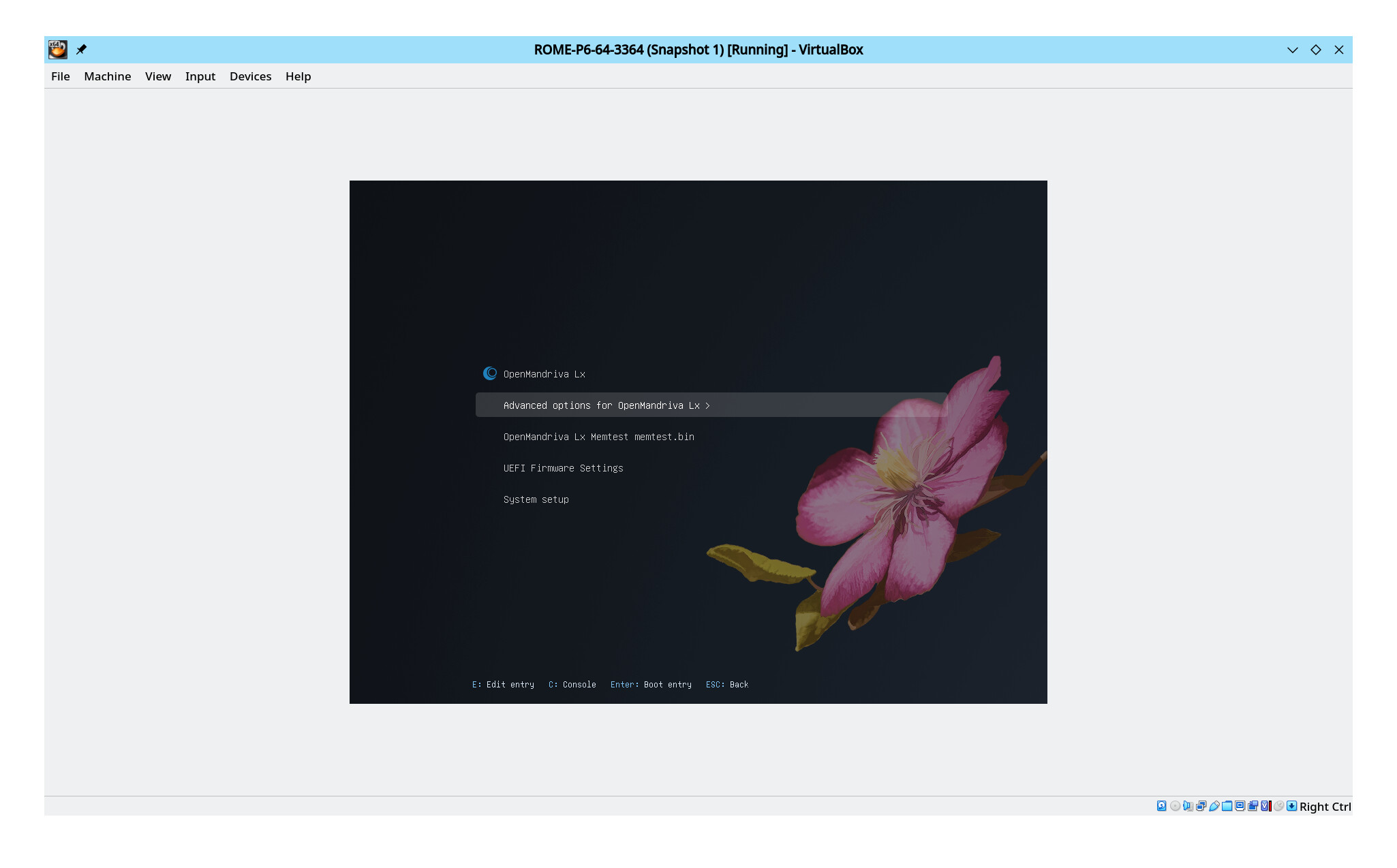
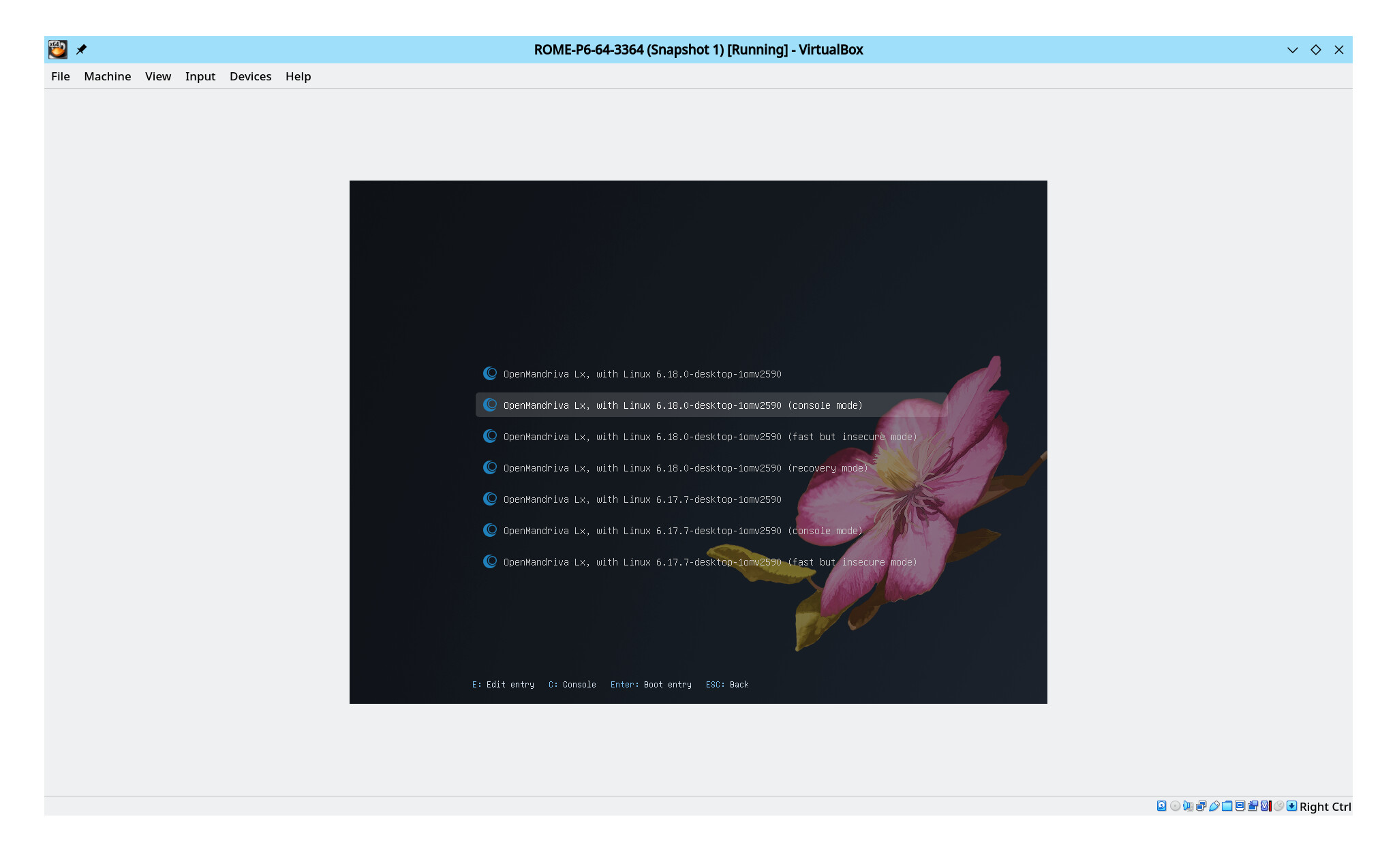
Boot system in console mode and login at the prompt >>> Important you are booting in to console mode from Advanced Options line in the grub menu not booting in to your graphical desktop.

But there is more than that so read the whole thing.

We hope to have new and corrected ROME isos soon. As you can see from the date of that article soon is a flexible term. Such is the nature of a distro when all contributors are part-time, unpaid, volunteers.

I’m not complaining, just posting about it. You can’t complain about free……..until you guys start getting some ngo money lol.

That link is actually what I followed that killed the install, I mentioned this in my first post but I couldn’t post a link here. If by “console mode” you mean a tty it was done from tty1 as that’s what it was booting to after the first attempt unless I manually started the DM. I got some suggestions in the chat to try cooker, which I think I will do…then I’ll try Rock

Tanks for reply,
Ok, it’s just an idea after consulting the forum and manual. The human work that OpenMandriva carries out is priceless to me. I have enormous respect for those who dedicate themselves to the project and the spirit that animates it. I will not suggest AI/LLM in the future.
I assumed that AI is not the solution to problems. Of course, AI operations shouldn’t be done blindly, just copy and paste. Solutions proposed by AI must still be reasoned and approved by those seeking support for artificial intelligence. I had similar problems reported in the post, the Openmandriva forum and manual with AI solved them.
The AIs mentioned gave solutions that I evaluated and they turned out to be different for each one. There were responses that I rated negatively because they were not supported by comparison with the OpenMandriva manual and forum. The AI that gave the most consistent responses with the OpenMandriva operating system was Claude, who did not create system blocks.

Greetings to you zeroability and Thank you to the entire OpenMandriva community, especially to those who actively and voluntarily keep the project alive.

@blazini36 No you do not want to do this upgrade from graphical desktop. Console mode is found in your grub2 menu under ‘Advanced options’.

It is possible the person that complains the most about ROME isos is me. That is because of how long this has gone unaddressed.

To use tty you would use Ctrl>Alt>F3-F6 for this.

Isn’t console mode a tty? Like I said, I have tried it straight from a tty as that is what it was booting to after the first failed attempt in the GUI, the login manager and window manager was never started in that case.

I just went and installed Cooker, then went to dnfdrake and enabled all channels and distro-sync worked perfectly fine.

Only issue so far with Cooker is something is up with bluetooth. I was able to pair a keyboard with no issue with Rome, and I did it several times. Now on Cooker for some odd reason it sees a couple of devices but refuses to find the keyboard, so I’m trying to figure that out.

Edit: Kind of odd but bluetooth just started working after I got tired of messing with it and just started searching the forum for an answer. My phone popped up and wanted to pair, then the keyboard just paired fine….so no idea but as long as it works….

1 Like

No. You reboot in to Console Moded, see the screen-shots. I seem to be failing to explain this adequately. See the screen-shots. If you do this from tty do not use tty 1 or 2 use 3, 4, 5, or 6.

This is part of what I am unhappy about. If we could get those upgrades and fixes in Cooker moved to ROME(rolling) we should be able to make some proper isos that work as they should.

Well the last attempt to update a fresh Rome install killed my user login so it was gonna be fairly difficult to deal with and I just needed to get that system going.

I did the Cooker install to eMMC. If there’s something you want to see I can install Rome to the SSD, as long as it won’t mess with the working Cooker install. Then if you can tell me exactly how to get the info you are looking for I can do that if it helps.

I am not looking for any info. I have tested installing from iso #4172 multiple times. I am reporting what works here and has worked for many users since I posted that article.

I know of no reason why that would be a concern. My understanding is that you are able to install from #4172 so you would have a working boot loader regardless of whether the upgrade is successful. Separate operating systems are just that separate. In any case fixing a broken boot loader is not that difficult if that should happen. There are articles regarding fixing broken boot loader in the Resources Index.

Oh, forgot to mention an important part, glad you got an OMLx Cooker system up and running. Looking forward to your contributions.

I use Cooker most of the time but for us less technical folks to keep Cooker working the big key is when to not upgrade. I would recommend joining the OM Chat Cooker channel and just watching the dialog and you’ll catch on.

The churn of new packages in Cooker is mostly constant. When there are certain groups of packages that have to be upgraded as a group and can be 100s of packages, like recently/currently python there are a lot of python package but a gazillion other packages that depend on python that all needs rebuilding or some changes and rebuilding. That can break things. Some things to watch for are upgrade to system package that come in groups like perl, glibc/libc, qt stuff, Plasma desktop, KDE Frameworks, KDE apps, there are some others, you’ll learn in the Cooker channel. It is just a question of timing. You can always ask in Cooker channel.

I also do multi-boot so I have other ROME and Rock partitions mostly for testing which I can use if Cooker is broken.

Am sure some other user can tell of some package groups to watch out for when they are upgrading.

To quote @bero directly from the dev channel just yesterday:

At the moment, my advice to anyone who doesn’t want breakages would be to install cooker and then switch the update channel to rolling once the cooker->rolling sync has happened

So there you go

Thanks for the info. I haven’t had any problems with Cooker as of yet, distro-sync worked fine. Rome actually worked fine too until it came time to update. So yeah I’ll probably do as you said and switch the upgrade channel to Rome when it’s safe to do so. This particular system has no reason to be on the bleeding edge though I do like a good rolling distro. I’ll keep an eye on the Cooker chat