Hello,
I am getting this error in VirtualBox when I attempt to load the Live install:
Error: out of memory

You need to load the kernel first.
I am using the openmandriva-6.0-plasma6-x11.x86_64.iso iso file.
Hello,
I am getting this error in VirtualBox when I attempt to load the Live install:
Error: out of memory
You need to load the kernel first.
I am using the openmandriva-6.0-plasma6-x11.x86_64.iso iso file.
Welcome.
Please fill out the template and provide more information about your VM setup. Otherwise, it is impossible for us to help you.
Hello,
Requirements:
Get OS running in virtualbox.
OpenMandriva Lx version:
openmandriva-6.0-plasma6-x11.x86_64.iso
Description of the issue (screenshots if relevant):
When Starting OS in Live mode, I get this error:
Error: out of memory
You need to load the kernel first.
Relevant informations (hardware involved, software version, logs or output…):
Intel i5
How much disk space and memory did you allocate? How many CPU’s?
If your problem isn’t important enough for you to take seriously then why should we help you?
Sorry, was getting to posting the specs.
I increased the RAM and CPUs. Since increasing the ram, now when I launch it, I just get a black screen. It has 4 GB of ram and 4 cpus assigned to it.
You may have to turn on or off the 3D acceleration. It can sometimes cause graphic oddities.
This might also provide some insight:
I understand our template is not easy to work with. We are trying to get the overall editing fixed since updating the version of Discourse. Performing the steps with the checkboxes can sometimes help. Virtualbox is one of those things that our testers use, so they know the ins and outs, and tend to post them here. The magnifying lens near your avatar in the top right is the search function.
In VBox for me the X11 isos do not work well I use the Wayland isos instead. Also play around with settings particularly Display>Graphic Controller. There is no one answer for that particular setting, user has to try and find what works.
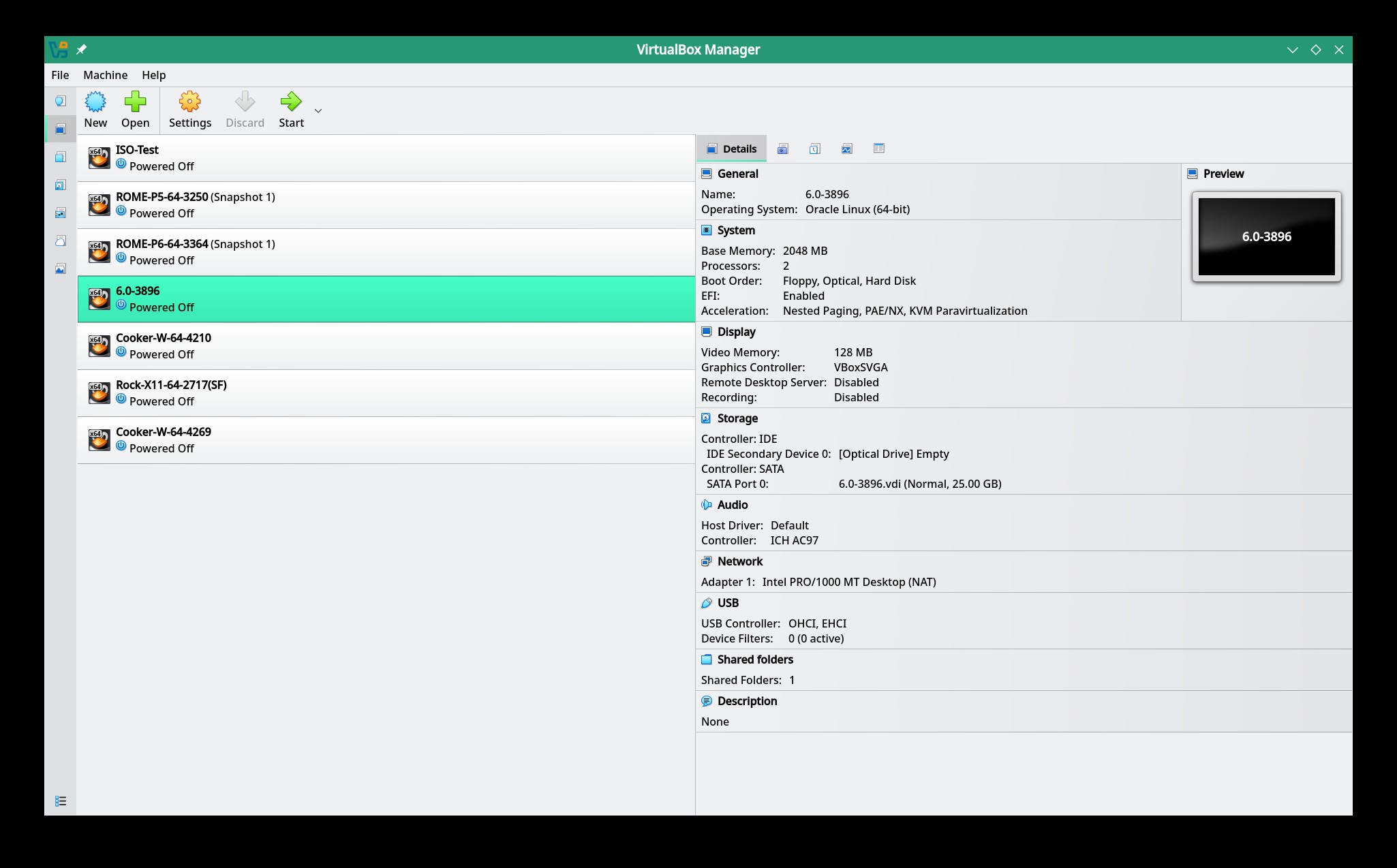
This is an example of working Rock/6.0 VBox VM:
Host machine is usually either OMLx Cooker or ROME. Don’t know how much, if any, difference the host machine might make in whether a VM works.
With virtualbox it host won’t matter
I tried this, and checked out the link, and couldn’t get it to work.
I tried the Wayland ISO instead, and I just get a black screen.
It sometimes does. Some graphics cards are finicky, and the 3D acceleration setting has never been consistent. Some processors that are supposed to be capable of VM support also don’t work with Virtualbox.
I have had success using this:
That’s a given. But that would also refer to if VirtualBox itself will work. Because VB doesn’t do any passthrough (by default). IF VB runs, then it’s just a matter of did you set up your vm correctly. VB sets up everything to use it’s own virtual gear. (unless something changed when I wasn’t looking)
KVM-QEMU (optionally with libvirt and virt-manager) are designed to let as much of the hardware pass through as possible - for example your cpu. Unless I tell qemu otherwise, any OS I create a vm for will get a ryzen 5950x and then the instructions will be passed directly.
This topic was automatically closed 30 days after the last reply. New replies are no longer allowed.