Description of the issue (screenshots if relevant):
<Installed OM LX 25.06 Rome from Live USB. I had to use the pcie_aspm=off modification to avoid the system freezing. After the first installation everything was fine for several days.
I cannot be sure what prompted the first failure but I suspect it had something to do with the system auto updating. I arrived to find the system completely frozen. I had to hold down the power button to force a reboot. But, instead of the normal login GUI I got a greenish blue login page with an error message:
The current theme cannot be loaded due to the errors below, please select another theme.
file://usr/share/sddm/themes/breeze/Main.qml:12:1: The plugin ‘usr/lib64/qt6/qml/org/kde/plasma/components/liborg_kde_plasmacomponents3.so’
uses incompatible Qt library. (6.10.0)
[release]
Entering my login password does nothing. Rebooting brings me back to the same page.
I have reinstalled OM 3 times now and during the set up (from scratch) I eventually encounter this same problem. I should point out that I was careful to ensure that there would be no auto updates occur but once while using DnfDrake a system update appeared but I promptly cleared it and continued with my efforts. However, I’m now back at that same page.
I am puzzled regarding what to do next. Should I try installing Rock instead?
Advise would be appreciated.>
**AMD Ryzen AI 9 HX PRO 370 with Radeon 890M (onboard gfx1150)
64 GB RAM (In BIOS dedicated 16 GB to GPU leaving 46.7 GB available)
KDE Frameworks Version: 6.13.0
Qt Version: 6.9.0
Kernel Version: 6.14.2-desktop-3omv2590 (64-bit)
Graphics Platform: X11>
That is from the sddm rename from plasma6-sddm. The forced power off has broken the dsync. It will need to be manually fixed.
If you are going to use ROME, make sure it’s a more recent ISO. We do have a lag between when we build ISO’s and when they end up on SF. Latest builds can be found here:
Thank you for your quick response to my problem. I am still fairly new to Linux so I am in the learning stages. I am not sure what is involved in a manual fix of dsync. Would you be able to give me more specific instructions?
Right now the system is completly unreachable. I will have to reinstall OM. Should I make a new Live USB with the most recent version of Rome or would it be advisable to use Rock and wait for news about any issues that might arise with the new Rome version?
I’m quite certain that whichever I use the first thing I will need to do is the pcie_aspm=off modification followed by a reboot. After that could you instruct me regarding this dsync fix? Thank you for your help.
I downloaded the image from the OM website on Oct 16. The name of the image is: OpenMandrivaLx.rolling-snapshot.20250801.4119-plasma6x11.znver1. I hope I got an appropriate version. I chose one which I thought was for newer AMD CPUs. But now I see some from the webpage I was referred to above which have the suffix ryzen which I assume is for AMD CPUs.
@ben79 I agree. It should not update anything unless you initiate the upgrade command. Could have been using the live-cd…, (it worked)…, he installed it…; …but he opted to use online connection (so his system would have the latest updated packages)… it updated to the latest packages…, and when he rebooted the updates (from initial installation) broke some of the stable stuff? (Like I had directed another user… (a breaking change is that plasma-sddm does not auto systemctl enable itself, and they get a terminal prompt at next login after reboot)) I believe he has issues because the updated packages were ok (worked just fine) on the live USB, but not good for his hardware after all the newer updates and rebooting to the (HDD) installed (non-live) system?
Right… well, my system does not automatically update… I run a command and then it updates… I also get prompted if I wish to accept the updates… or not.
After the first system crash I made sure that no updates would be installed automatically. However, I think I had it set to download updates but not auto install. It could be that while I was using DnfDrake that a system update appeared and I didn’t pay close enough attention to what I chose to install. I’m guessing, but the last install I set it to not even auto search for updates so I’m puzzled by what happened there.
At any rate, I’ll try the latest build and hope for the best.
Just made up a new Live USB with the 4292 build. Used it to install OM Rome and logged in when it finished. I immediately went to /etc/default/grub and entered the pcie_aspm=off modifications. Just as I was about to click save the screen went black. Then the login screen reappeared. I was about to login again and the screen went black again. The login screen fickered on then off again and now I am staring at a black screen with a tiny white underscore flashing in the upper left corner. This screen is completely unresponsive. It does not accept any commands, does not respond to login credentials, and does not respond to any other key strokes I have tried. At this point I am reluctant to force a reset but I can think of nothing else.
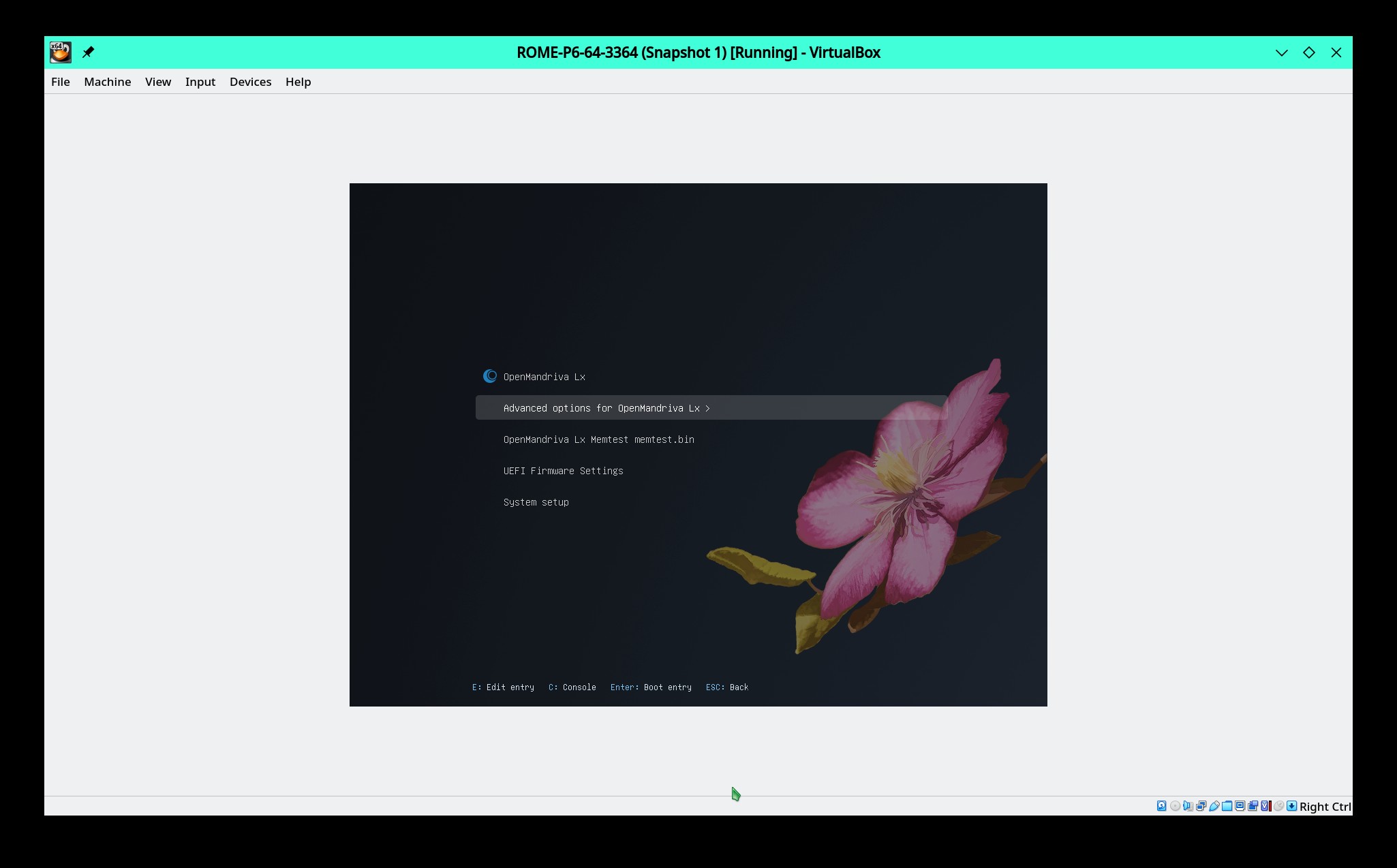
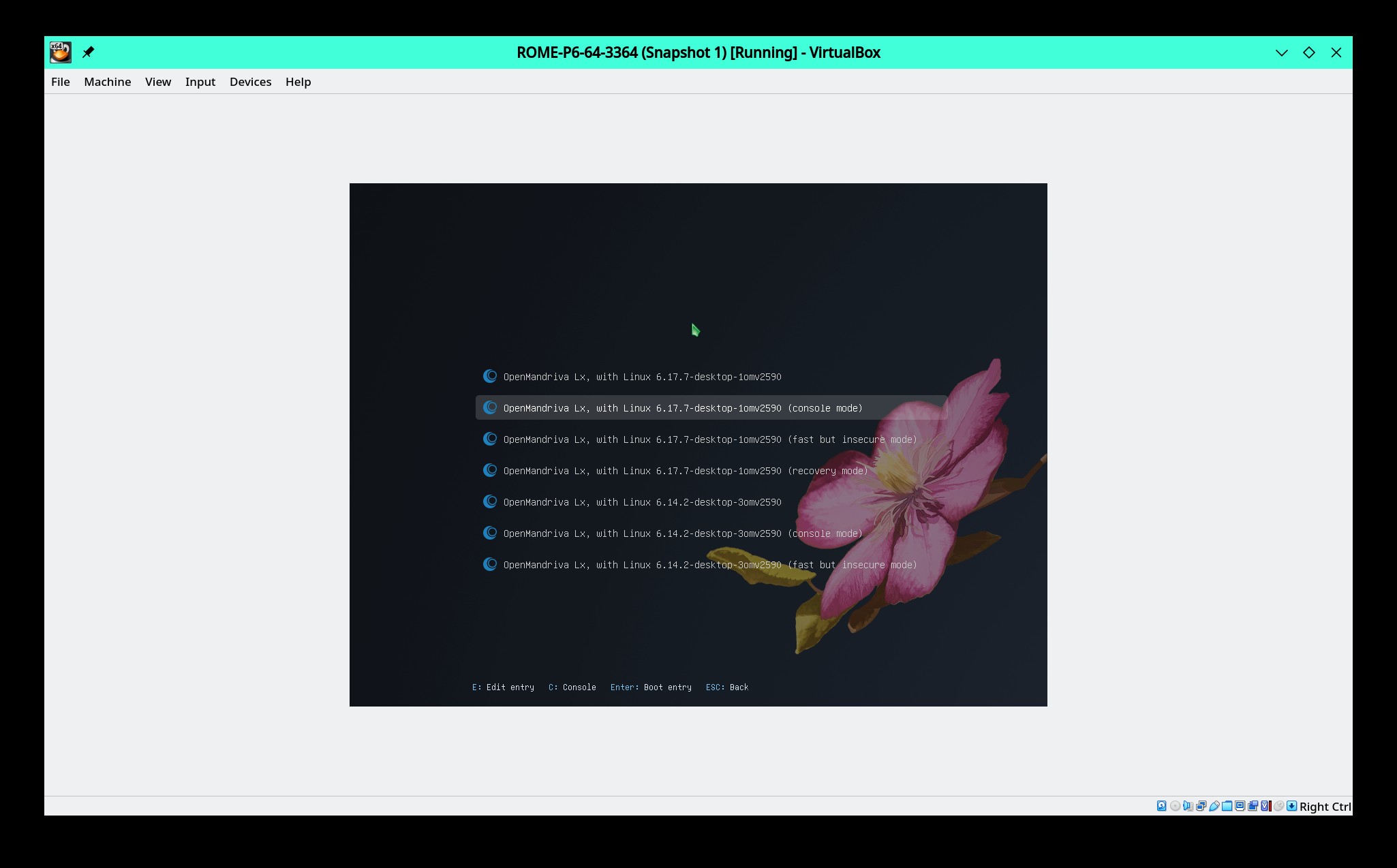
You want to boot using console mode. It is possible that to boot effectively you will need to edit the grub menu before booting: At the second screen shot above look at the bottom, you will see it says press ‘E’ for edit. Add the boot parameter to the linux line there if it is not present. Press ‘F10’ to boot. This change is only good for the current boot.
Login. Be sure that change was made in that file, if not make the change and save the file as root. Then you have to run sudo update-grub2. Then reboot.
Note: Any time user makes a change in /etc/defalt/grub you must run sudo update-grub2 to rewrite /boot/grub2/grub.cfg. the 'grub.cfg` file is what the system actually boots from.
Thank you. Followed the above instructions. After the boot up I again got a black screen but waiting for my login credentials. I entered them and it seems I am now in CLI mode on that same black screen. I am not certain what command I should enter. I’ve seen some posts about plasma-sddm other potential entries but I would appreciate directions rather than experimenting on my own.
Looks like I should enter the command:
systemctl enable –now plasma-sddm
But, I feel more comfortable waiting for confirmation from someone more knowledgeable than myself.
Tried systemctl enable -now plasma-sddm and got an error message in red letters: Failed to parse lines ‘ow’
Tried systemctl enable plasma-sddm and got an error message in red letters: Failed to enable unit: Unit plasma-sddm. service does not exist
Tried sudo systemctl enable sddm and rebooted. Logged in via GUI and made pcie_aspm=off modifications, saved, updated grub2 and almost immediately the screen went black again. I’m now back to the black screen with the flashing white underscore at the top left. Unresponsive screen.