OpenMandriva Lx release 26.02 (ROME) Rolling for znver1
Desktop environment (KDE, LXQT…):
KDE Plasma 6.5.5
KWin (XLibre)
Description of the issue (screenshots if relevant):
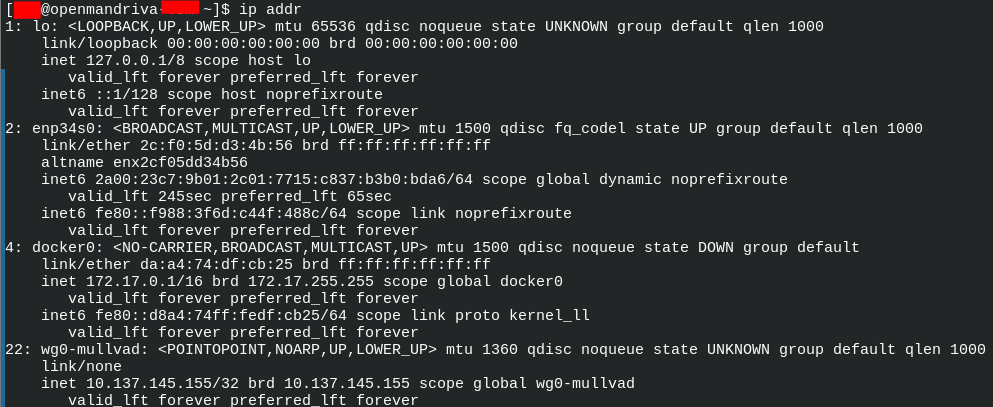
After an indeterminate amount of putting the system to sleep and waking, the LAN connection drops off from being seen by Linux. See below what it looks like:
Notably, I have Mullvad VPN installed (using the method described here: How to install Mullvad VPN in OpenMandriva ROME?) and I can still get Internet if I connect that. However, if I disconnect from Mullvad then the system fails to see any available network connection.
This means somehow Mullvad is seeing a connection despite nothing else on the system seeing it (or I wouldn’t be able to connect with it). It proves the physical link is fine, and a reboot fixes the problem until the next occurrence.
Relevant informations (hardware involved, software version, logs or output…):
I’m using a wired Ethernet connection. The Ethernet port is part of the motherboard. Like mentioned, a reboot fixes the issue until it occurs again.
This issue tends to happen after 3 or more sleep/wake cycles. I don’t think there is a specific number of cycles that trigger issue- seems random. It can happen whether Mullvad was running or not, so I don’t think that is the cause.
I have also had this problem, and I submitted an issue here. The issue seems to be the 6.19.0 kernel; I can get everything to operate normally if I boot the older 6.18 kernel.
I know they’re testing 6.19.3 in Cooker; hopefully there’ll be an update for ROME soon that fixes this. In the meantime (if you can’t revert to the older kernel), you can fix it after you wake up your machine by doing a release/renew:
I need to make a note of my interface name (its disappeared completely from the list). After the reboot and I’ve noted that, will test this workaround next time it happens.
Edit: After a reboot, turns out the interface was still listed, it just didn’t have an IPv4 address against it.
For me, the commands for the workaround will be: sudo dhclient -r enp34s0 sudo dhclient enp34s0
Not sure of this does/does not relate to OP’s problem.
Maybe I do this because I am old or maybe I do it because I believe hibernation, and suspend, not just in OMLx but in LInux do not work consistently. Sometimes new kernels affect it, sometimes I have no clue.
My nighttime procedure, unless I am uploading/downloading something is:
Turn off VPN (PIA)
Disconnect wifi
Run systemctl suspend from Konsole
Close laptop lid
Then restart wifi and VPN the next morning, Works vast majority of the time. Occasionally have to use nmcl commands to start wifi or systemctl restart NetworkManager or logout/login.
Mostly using Cooker or ROME systems regularly dsynced.