Description of the issue (screenshots if relevant):
It’s already quiet some time that i have important problems with LibreOffice Calc.
I made the update in June/July and things started not to work properly.
I focus on 2 issues
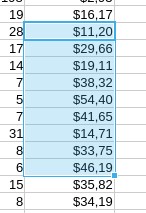
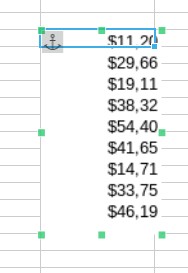
when i copy and paste a list of numbers form a sheet to another of the same file, now it pastes it as an image and there is no way to paste it as numbers, one per cell.
But if i copy and paste a single cell, then it pasts it well.
When i use conditional formatting ot mixs 2 different formatting choices. For examples: from d14:d26 i want a conditional formatting and from j14:j26 i want another. In both cases i choose gradient.
I save. i close. I open again and i find that i have a conditional formatting d14:d26;j14:j26.
useless to say that i was not like this before and that i use the same spreadsheet sin 2021 and eveything was working good before.
any tips?
Relevant informations (hardware involved, software version, logs or output…):
Which version of LibreOffice? I just tested on 25.8.3.1 (x86/64). I tested on Wayland.
When I copy a group of cells, I use the keyboard shortcuts Ctrl-C and Ctrl-V. I can copy between sheets and between files, no problems. Not sure how you are ending up with an image. How do you copy cells?
I don’t do much with cell formatting, so I can’t help with that. As long as the column is wide enough to show all the data, good enough for my purposes.
I did see that issue (copy-paste) once before - but it was on a much older version of LO on Mint. I don’t remember how I solved it though. Sorry.
Try creating a new spreadsheet as a test and see if it is still happening. If not, it’s a problem in that sheet.
Another way I have “rescued” problem files like this is just create a new document (whatever type I’m working on) and then use Ctrl A to select everything and paste it into the new doc.
It shouldn’t work. But at least 50% of the time it does. No idea why.
Version: 25.8.3.1 (X86_64) / LibreOffice Community
Build ID: 580(Build:1)
CPU threads: 8; OS: Linux 6.18; UI render: default; VCL: kf6 (cairo+xcb)
Locale: it-IT (it_IT.UTF-8); UI: it-IT
Calc: threaded
I tired to save the file in ods format and the second problem disappear. It means that in the ods format the conditional formatting stay correct even after that i cl
Your language is Italian. I use English. That difference should not matter.
I don’t know how to do it, but I recall reading a few years ago that in LibreOffice it is possible to copy a selection to an image in the clipboard instead of numbers, formulas, and text. I have no idea how to do that, as I came over from Windows and default to Ctrl-C and Ctrl-V when performing copy/paste.
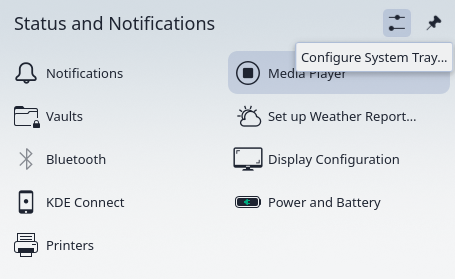
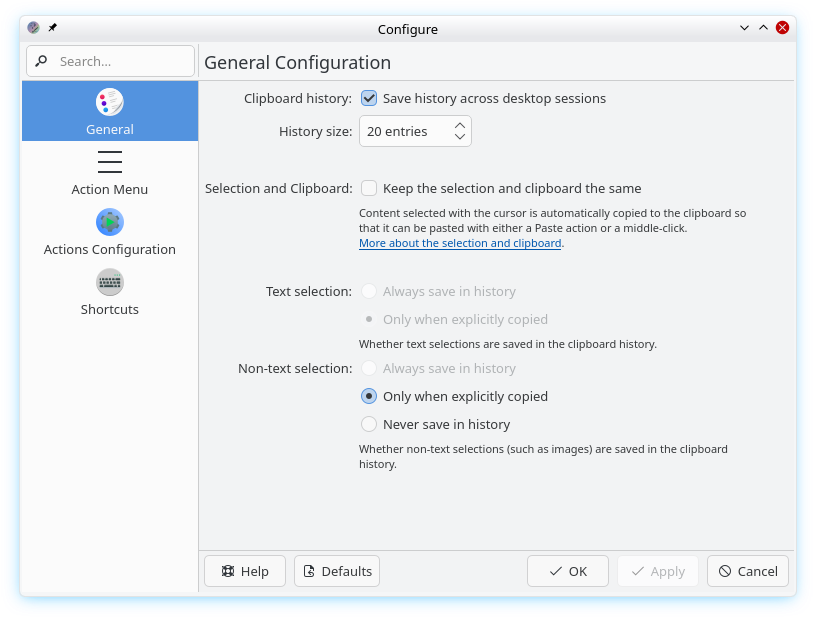
When you copy from the first sheet into Plasma’s clipboard, check the clipboard. Does it show text and numbers? Or does it show an image?
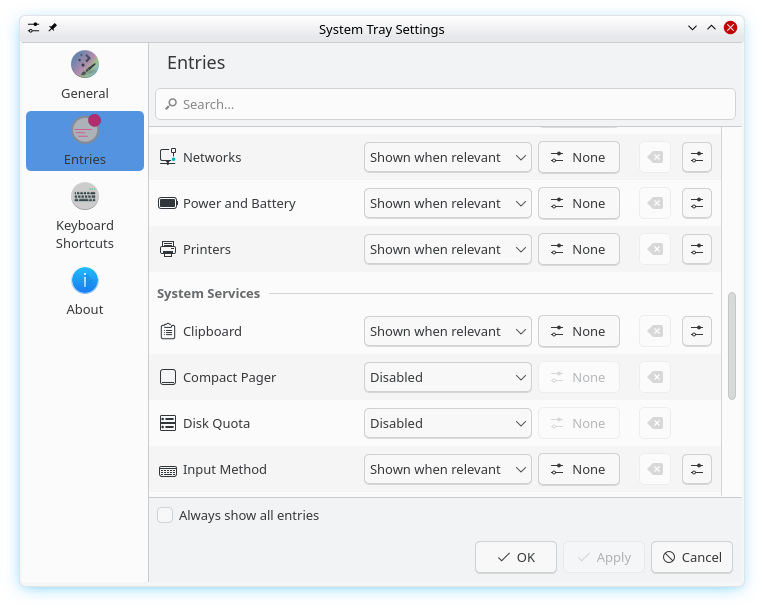
If the clipboard shows an image, look is in your Plasma’s clipboard configuration. Perhaps something was changed, and the clipboard is converting everything into an image.
The thing is that up to the update of May/June, everything was working fine. No problems. I could copy cells and paste them as numbers.
Did you open a bug report?
If i set it to “defaults” it works well.
But the question doesn’t change. Up to June the settings were : “keep the selection and the clipboard the same” and text selection “always save in history”.
i was copy and pasting and it pasted numbers or formulas, not images.
Sometimes the problem is not with OM, but with the desktop environment. This looks to be one of those. The fun comes in when users conclude the problem must be with OM when the problem is with the DE or its settings. I will give users a free pass on this because I assume many users are coming from Microsoft Spyware 10/11, an environment where everything including the kitchen sink and spare tire are fully integrated into the OS, unfortunately.
Not so sure on the free pass part. That was literally the second choice on my duckduck search (libreoffice cut paste text to image).
But we may want to add to the troubleshooting tips that people make sure to check other forums (like the kde or gnome or whatever) explicitly. Just to highlight the distinction.
In some cases the problem is actually caused by a bug in the newer release of the DE and fedora or mint are running the older version. Or vice-versa.
My life experience says 90% of the people will ignore checking the obvious. You would be surprised by the number of machine tool operators with “15 years experience,” confused by a tripped circuit breaker for the spindle motor staring them in the face. Or later in my life, the number of truck drivers who didn’t know they were missing their #3 position drive tire on their truck while going down the road. Better yet, inspecting an empty trailer and not noticing the door is off the hinges or the two holes in the roof produced by the last forklift operator.
I guess my default own setting is to just assume new users are coming from Spyware 10/11 and don’t know how to use a search engine properly.