LibreOffice Themes NOT working

This is a continuation of:

that I asked back in August where I mentioned at the end of that post that I couldn’t get libreoffice themes to work. Well, now it’s an issue

I have Searched the forum for my issue and found nothing related or helpful
I have checked the Resources category (Resources Index)
I have reviewed the Wiki for relevant information
I have read the the Release Notes and Errata

OpenMandriva Lx version:
OpenMandriva Lx release 6.0 (Vanadium) Rock for znver1

Desktop environment (KDE, LXQT…):
KDE (default)

This is the standard Rock install of libreoffice where I then (successfully) changed the icon set.

Yet when I try to set the theme (essentially the background for the toolbars, statusbars, etc) nothing works. I tried installing all the other LO themes available as extensions to see if they worked. They didn’t either.

You can change some colors in LO, with some options I saw a change, others not so much.

Searching around the web said there might be some kde issues and I should set the VCL plugin. That didn’t do anything.

Any idea?

Below is the list of everything I’ve got installed related to LO from the repo. At this point point my options seem to be rip everything out and re-install, flatpack, appimage.

libreoffice-base.znver1                            25.2.3.1-3                @rock-znver1              
libreoffice-calc.znver1                            25.2.3.1-3                @release-znver1           
libreoffice-common.znver1                          25.2.3.1-3                @release-znver1           
libreoffice-devel.znver1                           25.2.3.1-3                @rock-znver1              
libreoffice-devel-doc.znver1                       25.2.3.1-3                @rock-znver1              
libreoffice-draw.znver1                            25.2.3.1-3                @release-znver1           
libreoffice-extension-nlpsolver.znver1             25.2.3.1-3                @rock-znver1              
libreoffice-extension-numbertext.znver1            25.2.3.1-3                @rock-znver1              
libreoffice-gnome.znver1                           25.2.3.1-3                @rock-znver1              
libreoffice-gstreamer.znver1                       25.2.3.1-3                @rock-znver1              
libreoffice-help-en_GB.znver1                      25.2.3.1-3                @release-znver1           
libreoffice-help-en_US.znver1                      25.2.3.1-3                @release-znver1           
libreoffice-impress.znver1                         25.2.3.1-3                @release-znver1           
libreoffice-java.znver1                            25.2.3.1-3                @rock-znver1              
libreoffice-kde6.znver1                            25.2.3.1-3                @release-znver1           
libreoffice-kit.znver1                             25.2.3.1-3                @rock-znver1              
libreoffice-l10n-en_GB.znver1                      25.2.3.1-3                @release-znver1           
libreoffice-math.znver1                            25.2.3.1-3                @release-znver1           
libreoffice-openclipart.znver1                     25.2.3.1-3                @rock-znver1              
libreoffice-qt6.znver1                             25.2.3.1-3                @release-znver1           
libreoffice-style-breeze.znver1                    25.2.3.1-3                @release-znver1           
libreoffice-style-breeze_dark.znver1               25.2.3.1-3                @release-znver1           
libreoffice-style-breeze_dark_svg.znver1           25.2.3.1-3                @rock-znver1              
libreoffice-style-breeze_svg.znver1                25.2.3.1-3                @rock-znver1              
libreoffice-style-colibre.znver1                   25.2.3.1-3                @rock-znver1              
libreoffice-style-colibre_svg.znver1               25.2.3.1-3                @rock-znver1              
libreoffice-style-elementary.znver1                25.2.3.1-3                @rock-znver1              
libreoffice-style-elementary_svg.znver1            25.2.3.1-3                @rock-znver1              
libreoffice-style-karasa_jaga.znver1               25.2.3.1-3                @rock-znver1              
libreoffice-style-karasa_jaga_svg.znver1           25.2.3.1-3                @rock-znver1              
libreoffice-style-sifr.znver1                      25.2.3.1-3                @rock-znver1              
libreoffice-style-sifr_dark.znver1                 25.2.3.1-3                @rock-znver1              
libreoffice-style-sifr_dark_svg.znver1             25.2.3.1-3                @rock-znver1              
libreoffice-style-sifr_svg.znver1                  25.2.3.1-3                @rock-znver1              
libreoffice-style-sukapura.znver1                  25.2.3.1-3                @rock-znver1              
libreoffice-style-sukapura_svg.znver1              25.2.3.1-3                @rock-znver1              
libreoffice-wiki-publisher.znver1                  25.2.3.1-3                @rock-znver1              
libreoffice-writer.znver1                          25.2.3.1-3                @release-znver1  

I run Rock 6.0 too, and the default KDE desktop. I have the issue on my machine as well. You can change the colors somewhat, but the themes are not appearing as advertised.

(By the way, themes are accessed under Tools > Options > LibreOffice > Appearance)

I tried a couple different themes but neither worked. I tried uninstalling a theme, because I was going to try reinstall it. That introduced a new problem: The theme shows as “Installed” in the “Extensions: Color Themes” menu, but the theme is gone from the menu where you actually set the theme. I have no idea right now how to get it back. Be careful about uninstalling themes!

I tried setting an environment variable, as you suggested. Was it the SAL_USE_VCLPLUGIN variable? What value(s) did you use?

(I should say, I’m new to OpenMandriva and I’ve set environment variables only a couple times, and only on other Linux systems. Are the conventions similar? It seemed that you can set a temporary environment variable with the export command, that seemed to function the same. And I’m finding for other distros, for a permanent change, you’d add a line to ~/.bash_rc for a specific user, or to /etc/environment for a global change. Is that correct? I saw elsewhere on the forum and from my own poking around that you can set environment variables for a particular program in KDE by right-clicking on something, and selecting “Edit Application”. Is that equivalent to launching them from the console with that particular environmental variable?)

As I'm typing this I looked around and found this over on the LinuxMint forum:
https://forums.linuxmint.com/viewtopic.php?t=436853

there at the end they say that the issue we are having disappears in LO version 25.2.3.2

And Rock ships with 25.2.3.1

So this is a bone fide LO bug. I'm not sure what version of LO ships with the latest Rome build check the abf for that.

TLDR:
In order to get something close to usable I went and tweaked the colors in my actual KDE settings (colors & themes). Not ideal but it works for now. Worst comes to worst I’ll install the Flatpak or Appimage :man_shrugging:

======================================================================
Cool then so it’s not just me :sweat_smile:

As for the “uninstall” issue I haven’t noticed that but now that you’ve mentioned it I’ll test it out later today/tonight and get back to you. Especially since I can’t get it to actually use the themes anyway…

Correct. You’ll also find them in the “~/.config/libreoffice/4/user” directory tree - but I haven’t had the chance to muck around there in a long time.

kf6 if I remember. Also I set it by using the menu editor (right-click the icon in your kde menu → Edit Application) and you can set localized environment variables.

Yes it is. When I start testing again I’ll try SAL_USE_VCLPLUGIN with a value pf qt6 rather than kf6

As for bashrc a better spot for environment variables is the bash_profile. (obviously add the “.”) Anything you do int the etc files does affect system wide, but last I checked it shouldn’t matter in this case. Anything in the bash_profile is loaded on login; bashrc whenever you drop to terminal, so it only gets a copy of the profile values; and then every bash script get only a copy of the bashrc values. But info never flows back upstream. FWIW, here’s my bash_profile (without the LO stuff). Not saying it’s the best, but it works.

# .bash_profile

# Get the aliases and functions
if [ -f ~/.bashrc ]; then
    . ~/.bashrc
fi

# User specific environment and startup programs

# LocalBin=$HOME"/.local/bin"
# Bin=$HOME"/bin"
# PATH=$PATH:$LocalBin:$Bin:$AppImages:$Scripts

AppImages=$HOME"/Apps/AppImages"
Scripts=$HOME"/Apps/Scripts"

#Needed for HUGO
#------------------------
Golang="/usr/local/go/bin"
DartSaSS=$HOME"/.local/bin/dart-sass"

# if running bash
if [ -n "$BASH_VERSION" ]; then
    # include .bashrc if it exists
    if [ -f "$HOME/.bashrc" ]; then
	. "$HOME/.bashrc"
    fi
fi

# set PATH so it includes Go programming Language
if [ -d "$Golang" ] ; then
    PATH="$Golang:$PATH"
fi

# set PATH so it includes Dart-Sass
if [ -d "$DartSaSS" ] ; then
    PATH="$DartSaSS:$PATH"
fi

# set PATH so it includes user's private bin if it exists
if [ -d "$HOME/bin" ] ; then
    PATH="$HOME/bin:$PATH"
fi

# set PATH so it includes user's private bin if it exists
if [ -d "$HOME/.local/bin" ] ; then
    PATH="$HOME/.local/bin:$PATH"
fi

# set PATH so it includes user's AppImages if it exists
if [ -d "$AppImages" ] ; then
    PATH="$AppImages:$PATH"
fi

# set PATH so it includes user's Scripts if it exists
if [ -d "$Scripts" ] ; then
    PATH="$Scripts:$PATH"
fi

export PATH

PS: just now I installed the latest Appimage and it’s broken :joy:

1 Like

So after much mucking around with it, I have removed LibreOffice and installed the flatpak.

Works great. Seems to actually run faster than the native. But that could just be me imagining things

1 Like

Good find! So Rock will probably get this upgrade in the future. But that doesn’t help you right now, does it?

It sounds like a reasonable thing to try. I don’t have experience with those yet, so I can’t offer any help/advice on that front for now.

Using dnf list --installed | grep libreoffice I only have these below. I’m not yet sure where themes are stored so I will keep looking around, too.

libreoffice-calc.x86_64                            25.2.3.1-3                @release-x86_64     
libreoffice-common.x86_64                          25.2.3.1-3                @release-x86_64     
libreoffice-draw.x86_64                            25.2.3.1-3                @release-x86_64     
libreoffice-help-en_GB.x86_64                      25.2.3.1-3                @release-x86_64     
libreoffice-help-en_US.x86_64                      25.2.3.1-3                @release-x86_64     
libreoffice-impress.x86_64                         25.2.3.1-3                @release-x86_64     
libreoffice-kde6.x86_64                            25.2.3.1-3                @release-x86_64     
libreoffice-l10n-en_GB.x86_64                      25.2.3.1-3                @release-x86_64     
libreoffice-math.x86_64                            25.2.3.1-3                @release-x86_64     
libreoffice-qt6.x86_64                             25.2.3.1-3                @release-x86_64     
libreoffice-style-breeze.x86_64                    25.2.3.1-3                @release-x86_64     
libreoffice-style-breeze_dark.x86_64               25.2.3.1-3                @release-x86_64     
libreoffice-writer.x86_64                          25.2.3.1-3                @release-x86_64     

It didn’t occur to me to search LibreOffice documentation yesterday but I just found the info: Development/Environment variables for LibreOffice

I’ll have another try after I post, using qt6 and kf6.

I appreciate the explanation! It looks like you’re helping me more than I’m helping you :laughing: but thanks.

:grin:

no worries. This is a community forum where we help each other.

And yes, eventually this stuff will get around into the next version of Rock. But like I said, after spending a few hours on it (it became a personal challenge) it was just easier to install the flatpack.

The appimage requires a system library (because - why follow the appimage spec???); specifically libxml2.so.

We have it installed (albeit a newer version) and when you “install” the older versions (technically symlinks to the new) it still doesn’t work. Though I did get a different error message.

That was when I said enough was enough.

Oh, and if you’re looking for where the themes are stored (with the repo version) they’re here:

 “~/.config/libreoffice/4/user”
1 Like

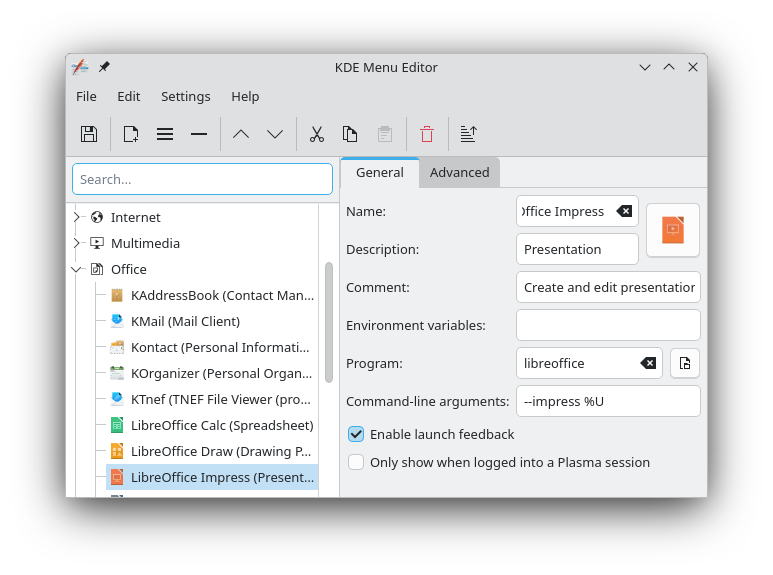
I found another minor issue relating to LibreOffice and its setup in Rock and/or KDE. Opening the LibreOffice applications from Application Menu > Office, I would get a “libreoffice does not exist” error if I tried to load LibreOffice Writer. By right-clicking on Writer, selecting “Edit Application”, I had this as the default entry.

But I found that I could open LibreOffice Impress from the menu just fine.

By comparing those, I just tried removing the libreoffice (including the space!) for the Command-line arguments field for Writer, and that did the trick. I can now start LibreOffice Writer from the Application menu. It’s not necessarily a big deal, but it might really throw off someone who’s new to Linux.

Anyway, with that aside…

I’ve tried using both of these values for SAL_USE_VCLPLUGIN, both on the LibreOffice launcher and the LibreOffice Writer (by right-clicking in KDE) and those didn’t help.

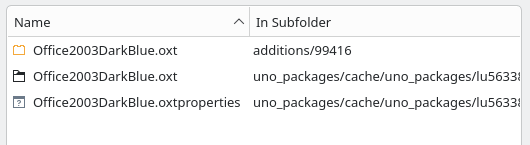
Good to know, thanks! I ran a search for the the name of the supposedly deleted theme Office2003DarkBlue* and there are still files for it present.

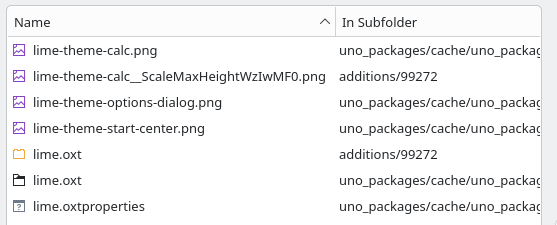
Compare that to the still installed theme lime* with the below files.

So it at least seems the theme files are still on there. (There’s still more stuff in the Office2003DarkBlue.oxt folder too.) Based on this, it’s looking like another LibreOffice bug.

Yeah. And that is why I went with the flatpak. Too many bugs in this version.

I’ll be installing Rome on another machine in a couple weeks and see if that version has them fixed.

Flatpak info:

version 25.8.3.2
https://git.libreoffice.org/core/history/8ca8d55c161d602844f5428fa4b58097424e324e

They had only finished building it 3 hours before I installed it.

Note to OMLx team regarding my earlier post:

I was having doubts about this part, so I decided to double-check with a new installation of OpenMandriva (I wanted to change my partitioning setup anyway so it was not a big deal). I just re-installed Rock 6.0 (and updated) and the LibreOffice menu items are working correctly. So somehow, I must have mucked up the dialog info for LO Writer. Please disregard that part of my earlier post.

1 Like

Been there done that got the t-shirt

Backup is your friend my friend…

Make a Foxclone usb or go to Terabyte and get the ImageForLinux toolset.

Foxclone is free, Terabyte is not. I use both and they have saved my bacon many a time.

And yes, you could do this with dd (they make a copy of a whole partition, not file based) but why??

1 Like

Great timing! I’m glad it seems to be working okay for you, after all of that.

Thanks! I’ll probably have a look at these this weekend.