ClamUI is presently a Flatpak that makes Clam antivirus protection in GNU/Linux much easier to manage and to visually see what is going on with Clam. I like and use it. I wanted to type up a tutorial on how to install and set it up so here it is.
First, you need to install Clam, its daemon, and the nano text editor using terminal:
sudo dnf in clamav clamd nano
Next, you need to allow Clam to get database updates with freshclam:
sudo nano /etc/freshclam.conf
Here all you have to do it put a hashtag in front of “Example” on Line 8. It should look like this:
#Example
Hold down CTRL then press X. Press Y to save the modified buffer. Press ENTER to save changes to freshclam.conf.
Now run:
sudo freshclam
The latest databases for Clam will now download and install.
Next, you need to enable the clamd daemon service to run:
sudo systemctl enable clamav-daemon
sudo systemctl start clamav-daemon
Now with clam set up, you can install ClamUI which is a Flatpak:
flatpak install flathub io.github.linx_systems.ClamUI
Lastly, you need to refresh the Application Launcher menus:
kbuildsycoca6
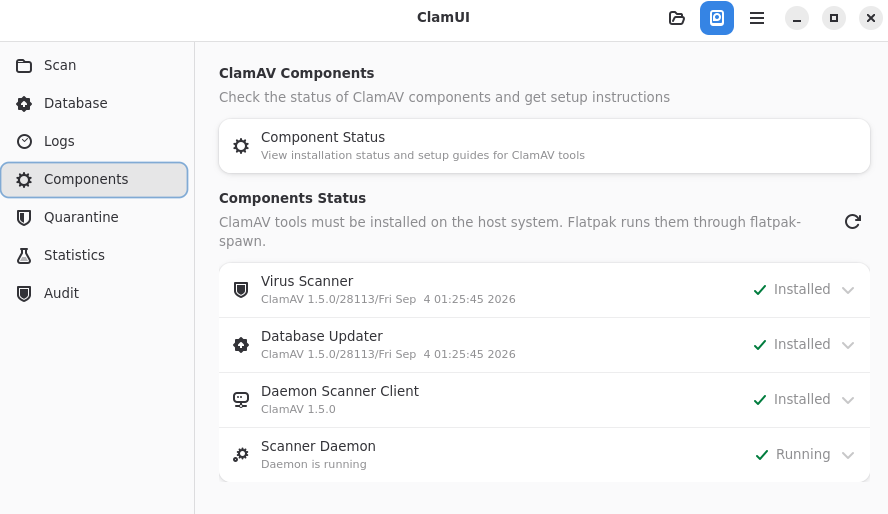
You should now be able to open ClamUI in the UTILITIES menu. In ClamUI, click on COMPONENTS on the left. Under COMPONENTS STATUS, the first three should say INSTALLED and the bottom fourth one should say RUNNING. If not, reboot your system, reopen ClamUI, and they should say the above.