OpenMandriva Lx release 6.0 (Vanadium) Rock for x86_64
-and-
Lubunu 24.04
Desktop environment (KDE, LXQT…):
KDE Plasma 6.3.4
Description of the issue (screenshots if relevant):
I recently set up another computer with a dual-boot installation. I firstly installed OpenMandriva and in this case the second OS was Lubuntu 24.04. I have attached a screenshot below on the main drive partition layout. This is an old PC with multiple HDD’s, the second drive has a 50/50 split with a /home folder for each OS installation.
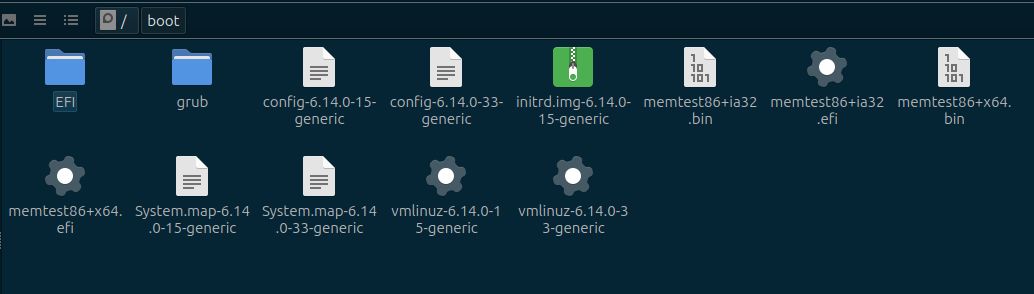
Unfortunately I had a momentary brain fade when installing Lubuntu, and instead of tagging the vfat partition as “/boot/efi”, I tagged it as “/boot”. So my vfat partition contains /boot/efi from OMA and /boot from Lubuntu. This is a problem because Lubuntu is having symlink errors with /boot being a vfat partition, I can probably just reinstall Lubuntu.
My question here is, how can I safely identify which files in that partition do NOT belong to OpenMandriva?
I want to at least attempt to fix the Lubuntu side for the learning experience, but it’s a fresh install with no content so I won’t mind if I have to scratch it and start over.
Relevant informations (hardware involved, software version, logs or output…):
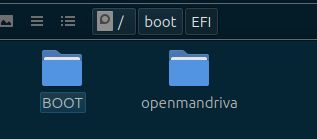
Everything other than the ‘EFI’ directory belongs to Lubuntu. You can see that in the 2nd image in your 2nd post. On my system, /boot/efi/EFI contains the following,
[sv@cooker-x11 ~]$ sudo ls /boot/efi/EFI BOOT openmandriva 'OpenMandriva_Lx_[GRUB]'
Do not worry about ‘OpenMandriva_Lx_[GRUB]’ if you are able to boot into OpenMandriva. You are fine on OM side.
Since, you are OK with experimenting, you could try the following. Please note, I am writing everything from memory and I could have missed a step or misspelled/mistyped a command. If something goes wrong, please don’t kill!
Boot into Lubuntu. Once booted, unmount the /boot partition with sudo umount /boot
Create ‘/boot/efi’ if it doesn’t already exist. sudo mkdir -p /boot/efi
Mount efi directory correctly. sudo mount /dev/sda1 /boot/efi
Move everything other than ‘EFI’ in /boot/efi to /boot.shopt -s extglob; sudo cd /boot/efi ; sudo mv !(EFI) ../ First part is to enable extended glob. This set should move everything inside /boot/efi except ‘EFI’ directory to its parent directory which is /boot. You could manually move each file/directory to /boot as well.
Now to fix permissions of files under /boot, generally permissions for directories is 755, for files is 644, except, initrd files have permission 600. You could refer to file permissions on my OM as posted below.
Do not forget to update your /etc/fstab and make /dev/sda1 mount on /boot/efi instead of /boot.
Do not forget to update initramfs and regenerate grub file. sudo update-initramfs -u; sudo update-grub
Thanks @sigvirt, that sounds like exactly what I wanted to do, including a few extra steps that I hadn’t thought of. The unmounting and remounting steps were the ones I was struggling to visualise. I like the shell option for extended globbing using !() to select “everything except (this thing)”, I didn’t know you could do that!
I’m just about to leave for work so I won’t be able to try this until I get home, but I appreciate the help and look forward to trying this later tonight.