NAME=“OpenMandriva Lx” VERSION=“25.90 (Nickel) Cooker” ID=“openmandriva” VERSION_ID=“25.90” PRETTY_NAME=“OpenMandriva Lx 25.90 (Nickel) Cooker” BUILD_ID=“20251017.10” VERSION_CODENAME=“nickel” ANSI_COLOR=“1;43” LOGO=“openmandriva” CPE_NAME=“cpe:/o:openmandriva:openmandriva_lx:25.90” HOME_URL=“``http://openmandriva.org/``” BUG_REPORT_URL=“GitHub · Where software is built” SUPPORT_URL=“``https://forum.openmandriva.org``” PRIVACY_POLICY_URL=“Terms of service - OpenMandriva”
Desktop environment (KDE, LXQT…):
KDE (but also checked on GNOME)
Description of the issue (screenshots if relevant):
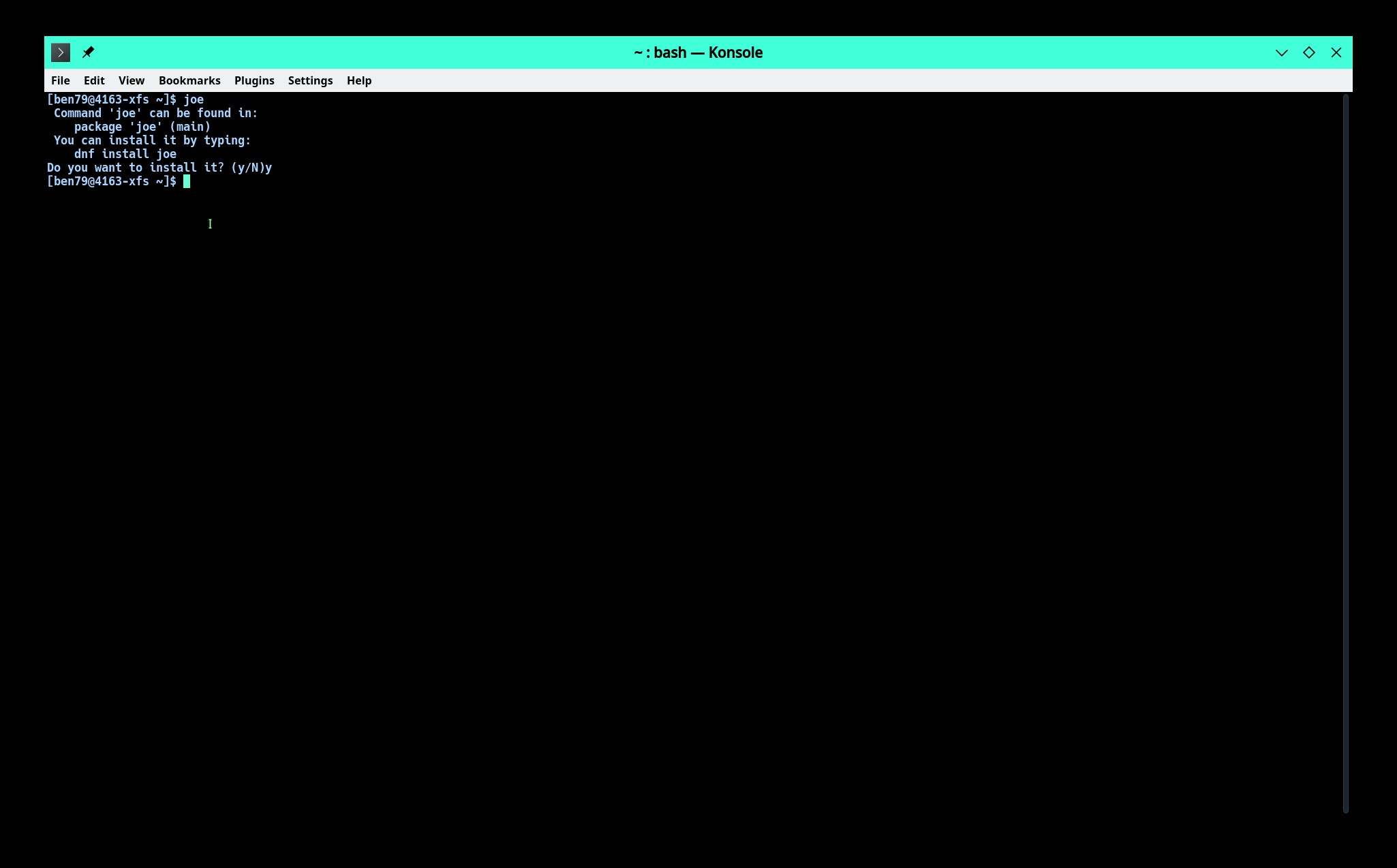
On the terminal, if we type name of a software that is not installed, we get suggestion that the program can be installed via dnf install programname. And asks if we want to install it. Pressing ‘y’ does nothing.
Relevant informations (hardware involved, software version, logs or output…):
[sv@cooker-x11 ~]$ irssi Command ‘irssi’ can be found in: package ‘irssi’ (main) You can install it by typing: dnf install irssi Do you want to install it? (y/N)y [sv@cooker-x11 ~]$ emacs-nox Command ‘emacs-nox’ can be found in: package ‘emacs-nox’ (main) You can install it by typing: dnf install emacs-nox Do you want to install it? (y/N)y [sv@cooker-x11 ~]$
From where do we get these suggestion (shell or particular program?). Where can we see what is going on in the background?
This may not be a serious issue but is an user experience (UX) issue nonetheless. I believe it should only suggest what command to be used to install and stop there or if offers to install, then should actually install it.
Probably…but is specific to OM I checked elsewhere and they just report ‘command not found’.
[sv@vbox ~ $] fish
bash: fish: command not found
I also installed ‘zsh’ to check and it also just says ‘command not found’.
sv@cooker-x11 ~ $ irssi
zsh: command not found: irssi
sv@cooker-x11 ~ $ emacs-nox
zsh: command not found: emacs-nox
sv@cooker-x11 ~ $ fish
zsh: command not found: fish
Is there a log or command to see what exactly is going on when such failure occurs? If I do echo $? shell just returns 127 which is ‘command not found’. Not very useful in our case.
That behavior is coming from /usr/bin/cnf command. See the following snippet.
print(_(" You can install it by typing:"), file=sys.stderr)
                print("    dnf install %s" % pkg, file=sys.stderr)
                if show_inst_prompts:
                    res = input(_('Do you want to install it? (y/N)'))
                    if sys.stdin.encoding and isinstance(res, str):
                        res = res.decode(sys.stdin.encoding)
                    # any not 'y' string rejects the installation
                    res = res.lower().strip()
                    if  res == _('y'):
                        os.system('dnf install ' + pkg)
I am just a fresh graduate from YouTube University with no real world project experience . So, have no idea what could be wrong there.
Agree. That would make the output consistent and also avoid complexity when package name and command name are not the same. For ex. wordnet is the package but binary is just wn.
I have a Cooker system dsynced today. What I am seeing is this:
$ joe
 Command 'joe' can be found in:
    package 'joe' (main)
 You can install it by typing:
    dnf install joe
$ caja
 Command 'caja' can be found in:
    package 'caja' (contrib)
 You can install it by typing:
    dnf install caja
$ jooee
jooee: command not found
$ caajfa
caajfa: command not found
I am happy with this behavior, should reach ROME(rolling) soon. Most of the building for this upgrade is done, AFAIK remaining is mostly building new kernel packages and some testing.
Aside: Added this information to Bug Report #3382.
@ben79 was there any update to the command-not-found package? On my VM the version I have is 1.3-11. I did dsync after seeing your message but still no joy.
Yes, looking at your command output, the behavior is OK to me as well as long as the data file is kept updated. However, as @bero mentioned on the GH issue page, the data file is not up-to-date. So, for any latest packages, the cnf behavior is not same. See below,
[sv@cooker-x11 ~]$ rbenv
rbenv: command not found
[sv@cooker-x11 ~]$ hyprlauncher
hyprlauncher: command not found
[sv@cooker-x11 ~]$ app2unit
app2unit: command not found
[sv@cooker-x11 ~]$ helium
helium: command not found
[sv@cooker-x11 ~]$ joe
 Command 'joe' can be found in:
    package 'joe' (main)
 You can install it by typing:
    dnf install joe
Do you want to install it? (y/N)y
[sv@cooker-x11 ~]$
I don’t know what Joe or caja are, but could the difference here be because some of those are intended to be terminal utilities and some are just intended to launch a separate GUI application?
@LeeTalbert, joe is a text editor and caja is file manager of MATE desktop. One is CLI application (I’m not sure if joe also has GUI counterpart like emacs does) and the other is GUI application. So, that is not the reason. What I meant was without the data.json file used by command-not-found being up-to-date, the output will now have three variation instead of two.
I am using Cooker in a qemu vm at the moment and it still has the old behavior. So actually things may be worse, the behavior seems to be inconsistent. I am definitely seeing different behavior in my hw Cooker vs. my qemu vm Cooker.
 I checked elsewhere and they just report ‘command not found’.
 . So, have no idea what could be wrong there.