Hello,
Requirements:
I have Searched the forum for my issue and found nothing related or helpful
I have checked the Resources category (Resources Index)
I have reviewed the Wiki for relevant information
I have read the the Release Notes and Errata
**OpenMandriva Lx version:6
Desktop environment (KDE 6, ):
Description of the issue (screenshots if relevant):
Issues
A lot of weird, little strange and random behaviors hard to document catch and categorize
Resolution issues
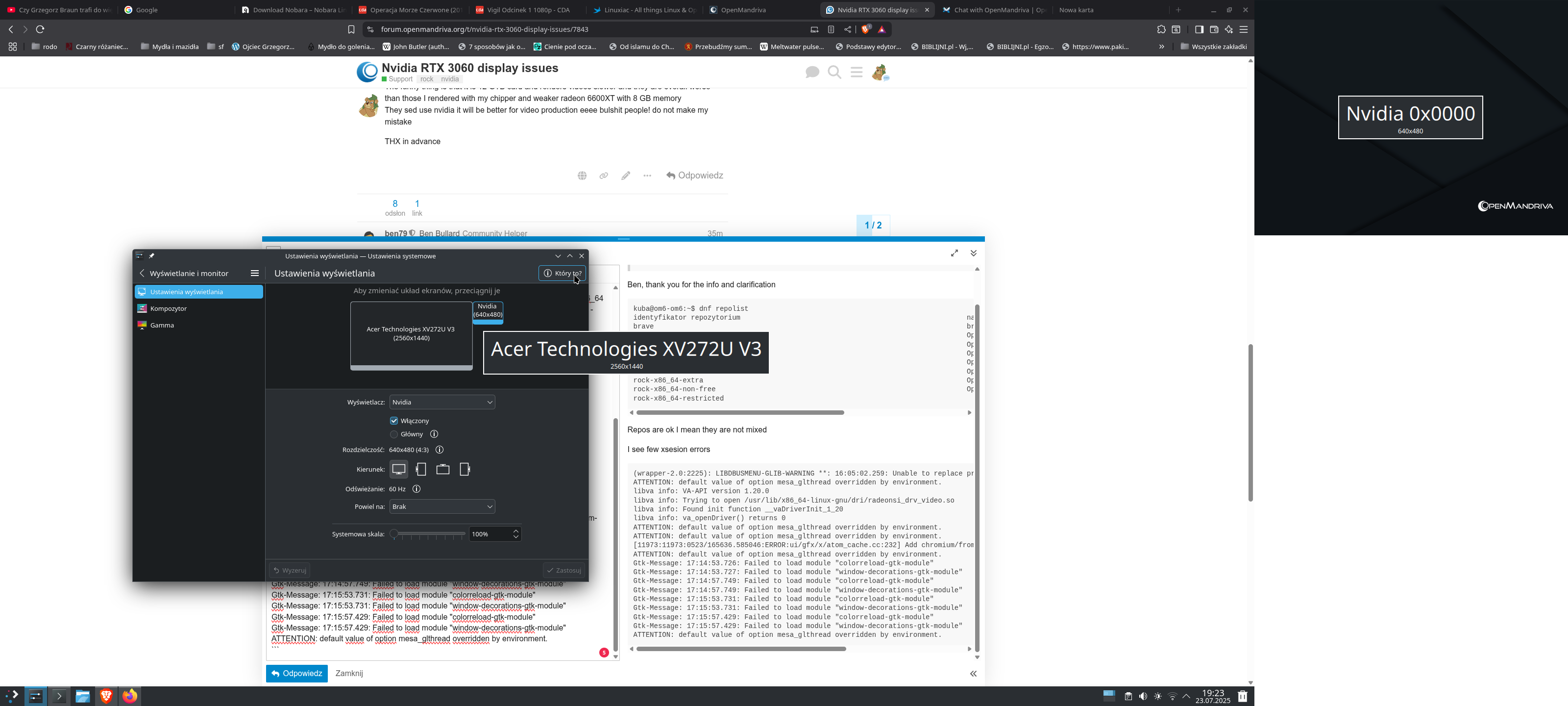
One monitor recognized as my acer monitor, other as nvidia. The monitor recognized as NVIDIA have resolution 640 X 480
Restart helps usually.
Blank monitors
Monitor two right seen as monitor on a left
Kde gui gliches
Missing kde panels weird freezes and stuff like that
card
01:00.0 VGA compatible controller: NVIDIA Corporation GA104 [GeForce RTX 3060] (rev a1)
cpu
vendor_id : AuthenticAMD
cpu family : 25
model : 80
model name : AMD Ryzen 5 5600G with Radeon Graphics
mainboard
Base Board Information
Manufacturer: ASRock
Product Name: B450M-HDV R4.0
uefi firmware version
BIOS Information
Vendor: American Megatrends Inc.
Version: P10.10
Release Date: 01/24/2024
Repos I have add to a system
How To edit repositories for your OMLx system (Plasma or LXQt) - #7 by ben79 its @ben79
What has been installed by me
nvidia.x86_64
What is actually in my system
rpm -qa | grep -i nvidia
nvidia-firmware-20250413-1.noarch
lib64nvidia-egl-wayland1-1.1.18-1.x86_64
nvidia-32bit-575.51.02-1.x86_64
nvidia-modprobe-575.51.02-1.x86_64
nvidia-persistenced-575.51.02-1.x86_64
nvidia-kmod-desktop-575.51.02-1_6.14.2_3.x86_64
nvidia-575.51.02-1.x86_64
nvidia-kmod-common-575.51.02-1.noarch
What dnf search nvidia shows
LANG=C dnf search nvidia
Last metadata expiration check: 0:03:36 ago on śro, 23 lip 2025, 15:51:55.
========================================================================== Name & Summary Matched: nvidia ==========================================================================
nvidia.x86_64 : Binary-only driver for NVIDIA graphics chips
nvidia-32bit.x86_64 : Binary-only 32-bit driver for nvidia graphics chips
nvidia-dkms-kmod.x86_64 : NVIDIA display driver kernel module. **This is an unsupported proprietary driver. Use with caution!
nvidia-dkms-kmod-open.x86_64 : NVIDIA driver open kernel module flavor
nvidia-firmware.noarch : NVIDIA Firmware
nvidia-kmod-common.noarch : Common file for NVIDIA's proprietary driver kernel modules
nvidia-kmod-desktop.x86_64 : Kernel modules needed by the binary-only nvidia driver for kernel desktop 6.14.2-3
nvidia-kmod-desktop-gcc.x86_64 : Kernel modules needed by the binary-only nvidia driver for kernel desktop-gcc 6.14.2-3
nvidia-kmod-headers.x86_64 : NVIDIA header files for precompiled streams
nvidia-kmod-open-desktop.x86_64 : Open kernel modules needed by the binary-only nvidia driver for kernel desktop 6.14.2-3
nvidia-kmod-open-desktop-gcc.x86_64 : Open kernel modules needed by the binary-only nvidia driver for kernel desktop-gcc 6.14.2-3
nvidia-kmod-open-server.x86_64 : Open kernel modules needed by the binary-only nvidia driver for kernel server 6.14.2-3
nvidia-kmod-open-server-gcc.x86_64 : Open kernel modules needed by the binary-only nvidia driver for kernel server-gcc 6.14.2-3
nvidia-kmod-open-source.noarch : NVIDIA open kernel module source files
nvidia-kmod-server.x86_64 : Kernel modules needed by the binary-only nvidia driver for kernel server 6.14.2-3
nvidia-kmod-server-gcc.x86_64 : Kernel modules needed by the binary-only nvidia driver for kernel server-gcc 6.14.2-3
nvidia-legacy.x86_64 : Legacy binary-only driver for nvidia graphics chips
nvidia-legacy-32bit.x86_64 : Binary-only 32-bit driver for nvidia graphics chips
nvidia-legacy-dkms-kmod.x86_64 : NVIDIA display driver kernel module. **This is an unsupported proprietary driver. Use with caution!
nvidia-legacy-kmod-common.noarch : Common file for NVIDIA's proprietary driver kernel modules
nvidia-legacy-kmod-desktop.x86_64 : Kernel modules needed by the binary-only nvidia driver for kernel desktop 6.7.1-1
nvidia-legacy-kmod-headers.x86_64 : NVIDIA header files for precompiled streams
nvidia-legacy-kmod-rc-desktop.x86_64 : Kernel modules needed by the binary-only nvidia driver for kernel rc-desktop 6.7.0-0.rc6.1
nvidia-legacy-kmod-rc-server.x86_64 : Kernel modules needed by the binary-only nvidia driver for kernel rc-server 6.7.0-0.rc6.1
nvidia-legacy-kmod-server.x86_64 : Kernel modules needed by the binary-only nvidia driver for kernel server 6.7.1-1
nvidia-modprobe.x86_64 : NVIDIA kernel module loader
nvidia-persistenced.x86_64 : A daemon to maintain persistent software state in the NVIDIA driver
nvidia-settings.x86_64 : Configure the NVIDIA graphics driver
nvidia-vaapi-driver.x86_64 : Nvidia Driver for Video Acceleration (VA) API for Linux
python-nvidia-ml-py.noarch : Python Bindings for the NVIDIA Management Library
=============================================================================== Name Matched: nvidia ===============================================================================
lib64nvidia-egl-wayland-devel.x86_64 : Wayland EGL External Platform library development package
lib64nvidia-egl-wayland1.x86_64 : Wayland EGL External Platform library
============================================================================= Summary Matched: nvidia ==============================================================================
envycontrol.noarch : Easy GPU switching for Nvidia Optimus laptops
ffnvcodec-headers.x86_64 : FFmpeg version of headers required to interface with Nvidia codec APIs (NVENC)
gwe.noarch : GreenWithEnvy ia a system utility designed to provide information of NVIDIA card.
lib64nvtvsimple-devel.x86_64 : Library to enable TV-Out on Linux for NVIDIA cards
lib64nvtvsimple0.x86_64 : Library to enable TV-Out on Linux for NVIDIA cards
libclc-nvptx.x86_64 : Nvidia PTX backend for the libclc OpenCL library
nvptx-tools.x86_64 : Binutils-like tools for using Nvidia GPUs with GCC
nvtop.x86_64 : GPU process monitoring for AMD, Intel and NVIDIA
nvtv.x86_64 : Enable TV-Out on Linux for NVIDIA cards
python-gpustat.noarch : An utility to monitor NVIDIA GPU status and usage
python-py3nvml.noarch : Python 3 Bindings for NVML library. Get NVIDIA GPU status inside your program.
x11-driver-video-nouveau.x86_64 : Accelerated open source driver for NVIDIA cards
Sorry for this wall of text
The question is, do I need any additional elements shown in What dnf search nvidia shows to be installed, to make my Nvidia Rtx 3060 run fairly smooth, or I’m just doomed?
Should I use drivers from Nvidia site directly?
The funny thing is that it is 12 GTB card and renders videos slower and they are overall worse than those I rendered with my chipper and weaker radeon 6600XT with 8 GB memory
They sed use nvidia it will be better for video production eeee bulshit people! do not make my mistake
THX in advance