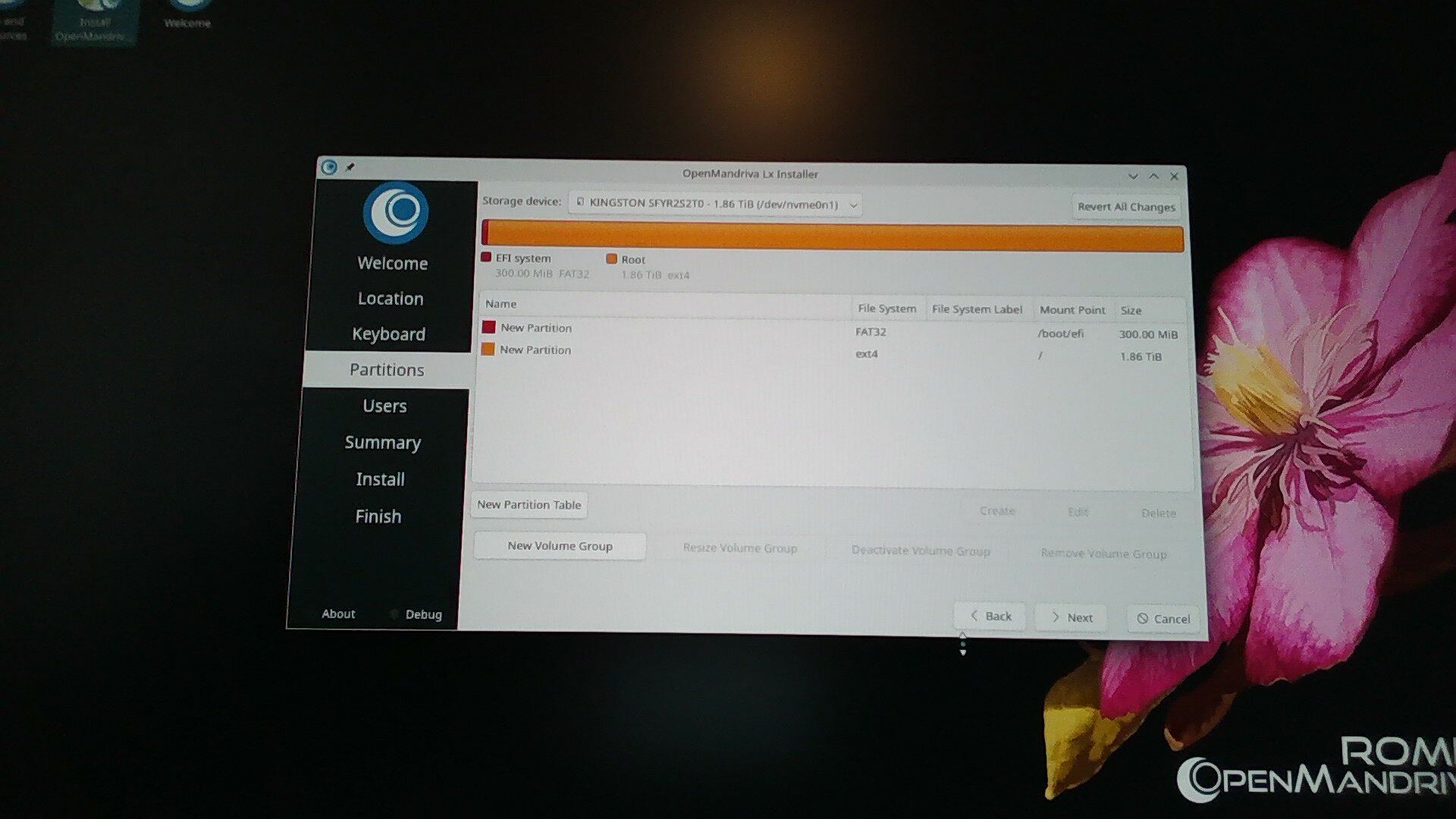
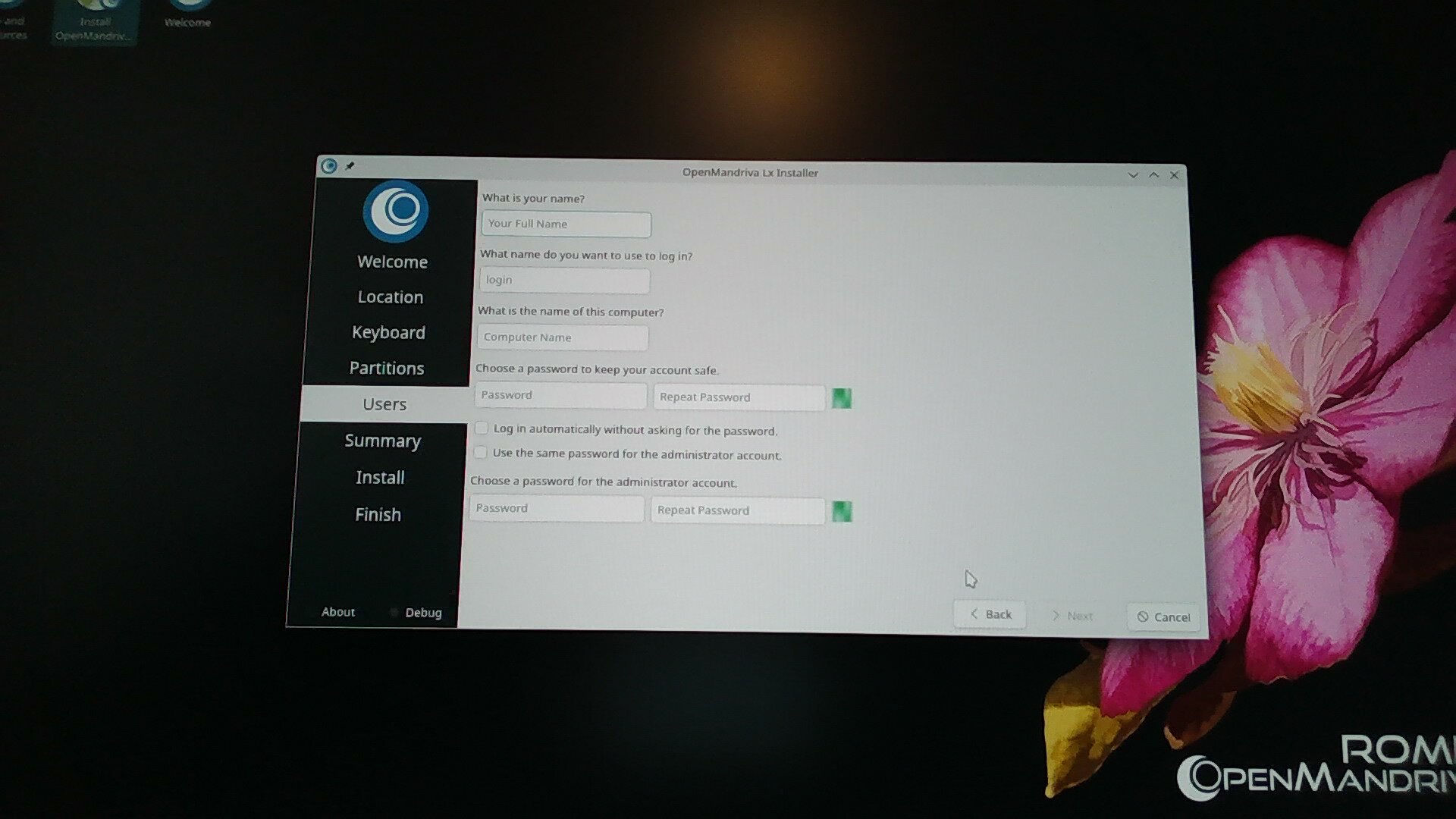
New install build 4292 ->: tty1 blinky cursor; instal icon; 3 efi_grub entries

Hello,

Requirements:

I have Searched the forum for my issue and found nothing related or helpful
I have checked the Resources category (Resources Index)
I have reviewed the Wiki for relevant information
I have read the the Release Notes and Errata

OpenMandriva Lx version:

os-release.txt (496 Bytes)

inxi-Fz.txt (2.9 KB)

Desktop environment (KDE, LXQT…):

KDE Plasma 6

Description of the issue (screenshots if relevant):

I have done multiple fresh installs of ROME Build version 4292. All result in the same behaviour.
All were on the same, new hardware, with no gup (IGP only).
Only differences were swapping the storage device
I have done 3 installations on a Kingston Renegade 2TB Gen5 M.2
2 installations on a T-Create 1TB Gen3 M.2
1 Installation on a Samsung 850 EVO 250GB 2.5" SSD.
All installations were from the same ISO of build 4292 burned directly to a USB using Balena Etcher in Ubuntu. The image was checked against both the md5 and the sha256 checksums and passed.
All installations were done using “Erase Disk” option.
All installations bar the first one on the Gen5 M.2 were done on storage devices with all partitions removed and a new GPT applied using Gparted in Ubuntu.
EDIT 1: (This 1st installation on the Gen5 M.2 was also done with the same ISO only using Ventoy, and md5 checksum’ed using ventoy’s built in tool)

Symptom 1:
After the install completes the system boots to the GUI Log-in screen fine, but after logging in it goes to tty1 with the blinky cursor, I need to switch to tty2 to find the GUI / Desktop Environment.
Symptom 2:
The “Install Open Mandriva” desktop shortcut is still present. When run, it pops up a warning, “no installation media present” (or words to that effect, I almost forgot about this) EDIT: I just checked this again, it asks for password first, then says “There are no partitions to install on”
Symptom 3:
There are 3 entries in /boot
1st one is: /boot/efi/EFI/BOOT/bootx64.efi
2nd one is: /boot/efi/EFI/openmandriva/grub.efi
3rd one is: /boot/efi/EFI/OpenMandriva_Lx_[GRUB]/grub64.efi
On starting the system, F11 (boot menu) offers 2 boot options
:- OpenMandriva_Lx_[GRUB] (storage device name)
:- UEFI OS (storage device name)
Both of these options seem to yield the same results.

I do not know whether they are symptoms of the same issue or different issues.

I have also encountered these same symptoms as well as others while upgrading from older versions of ROME (4011 and another which I can’t remember), all of which have been referred to in other posts. From what I have read though, they were all referring to upgrades, not fresh installs. That is why I did these tests, and why I thought a new post in here might be useful.
I guess I am also putting off trying messing with the .efi files as mentioned in this thread because I’m scaredy cat.

Relevant informations (hardware involved, software version, logs or output…):

From the install on the Gen3 M.2
journalctl_test_G3_1.txt (1.1 MB)

From the SSD install
journalctl_test2_SSD-1.txt (358.3 KB)

I also have copies of the .efi files from both the SSD and Gen3M.2 installations but they don’t show up in the upload box. I’m guessing
cat /boot/efi/EFI/foldername/filename > filename.txt
will do what I need but didn’t think to do that at the time.

I was going to upload the installation logs of the next install on the Gen5, but couldn’t find how to generate it (Or at least the search AI didn’t give good references for its suggestion). If someone can tell me how to do that I will update this post with the results.
EDIT: 5 I think I found the log from the latest Gen5 Install
Calamares.log.txt (135.9 KB)

EDIT 2:
This is the speculation of an ignoramus, but I’m wondering.
If symptoms 2 and 3 are related, could it be that the installation is adding the .efi file from the live installer version and labelling them wrong?

EDIT 3:
I just checked my notes again and realised I forgot 2 other things.

  • After the first install on the Gen3 M.2, after the first reboot, there was a Warning message flashed immediately before the log-in screen. It was to quick to read, all I caught was ”Warning, Unprivileged (? BPF… ?)…..”
  • On the same installation, after the second boot, there were NO tty’s responding. All of them (1 –> 6) were nothing but my old friend Mr. Blinky Cursor.

EDIT 4:
These are the .txt files of the 3 /boot/efi/EFI entries.
They are from another new installation on the Gen5 M.2

BOOT-bootx64.efi.txt (148 KB)

openmandriva-grub.efi.txt (1.7 MB)

Ok, so when I try to upload the third one (OpenMandriva_Lx_[BOOT]-grubx64.efi.txt) it uploads the first one instead. Also, the two original files in /boot are the same size.
Exact same file contents?
xx@xx:/media/xx/E402-E04A$ diff BOOT-bootx64.efi.txt OpenMandriva_Lx_[GRUB]-grubx64.efi.txt
xx@xx:/media/xx/E402-E04A$
I believe this means the contents are exactly the same?
Yes! md5sums of the original files are the same also.
1 Like

This is probably the command you want:

I believe the [GRUB] option is not really needed. I had removed it when I changed my CMOS battery. You can also use it to remove the UEFI entries that other distros install and do not get removed when you distro hop.

Hey @zeroability thanks for this

I was planning on digging into managing those boot entries today, that has/will help a lot.
I would like to ask some questions / seek some confirmations first though

1: Do you have any insight into… why
/BOOT/bootx64.efi
and
/OpenMandriva_Lx_[GRUB]/grub64.efi
were duplicates of the same file? (I think I confirmed this with the matching md5 sums)
It seems to me there must be something funny going on during install for this to be the case.

2: From whatever limited understanding I have gathered reading the related posts and looking at my own system.

  • /BOOT/bootx64.efi
    is an entry created (by the system bios?) as a fallback .efi for whatever reason.
    This .efi is offered through the mobo boot menu (F11)

  • /OpenMandriva_Lx_[GRUB]/grub64.efi
    is the one actually being booted from.
    This is the only one offered in the BIOS boot order priorities (other than usb; cd/dvd etc) and is also offered through F11 boot menu.

  • /openmandriva/grub.efi
    is the one that’s actually supposed to be loaded.
    This is just an assumption on my part

Assuming that the above are all true, this would mean I should replace the contents of
/OpenMandriva_Lx_[GRUB]/grub64.efi
with the contents of
/openmandriva/grub.efi
Correct?

3: If the correct .efi is
/openmandriva/grub.efi
why is it the only one that isn’t named with xxx64.efi? I would have thought that the “64” refers to 64 bit. It seems this should be the standard case except perhaps in an installer on a usb formatted in fat16. (I think Fat32 can store 32bit (words?) but Fat16 cannot?)

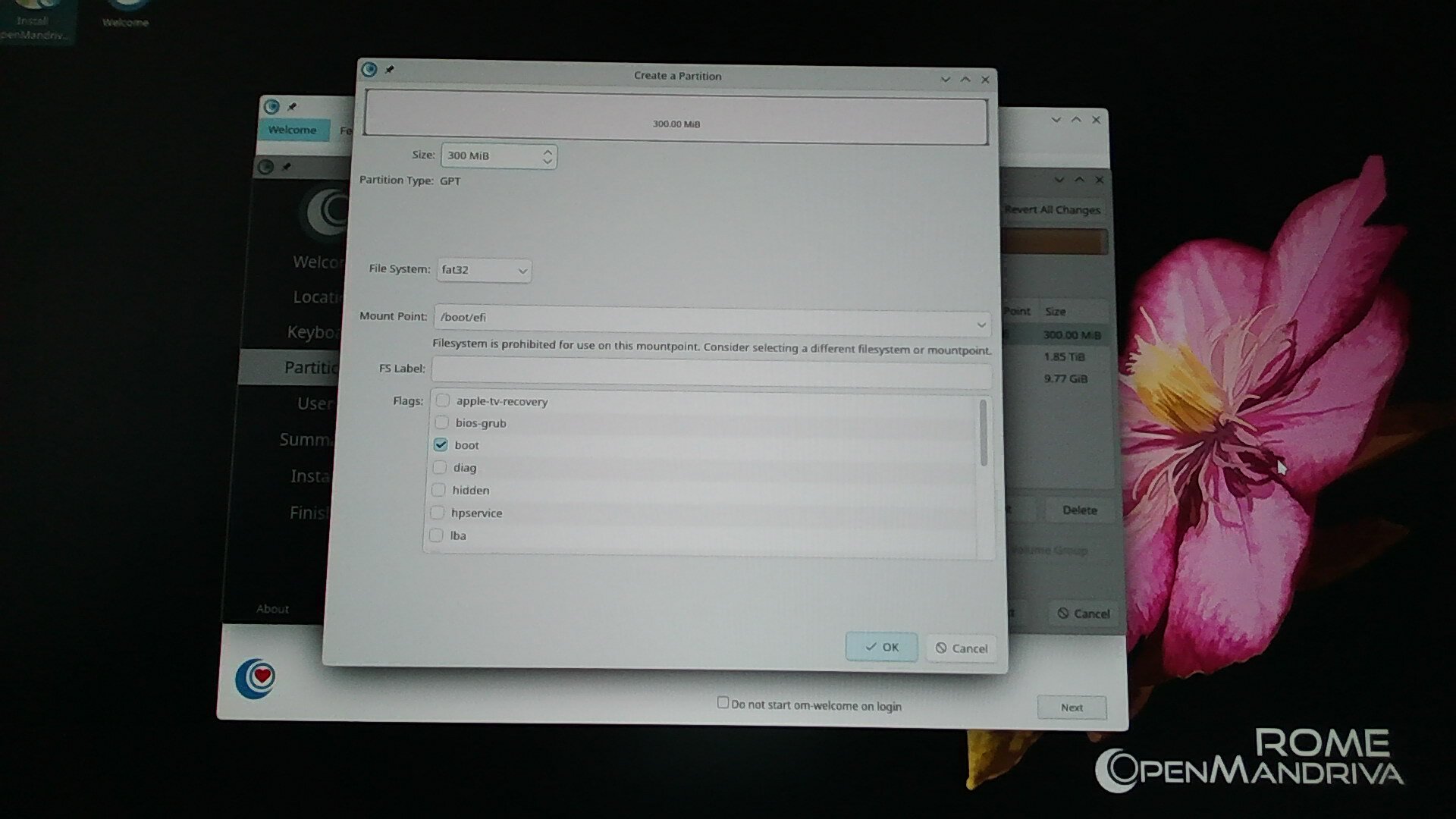
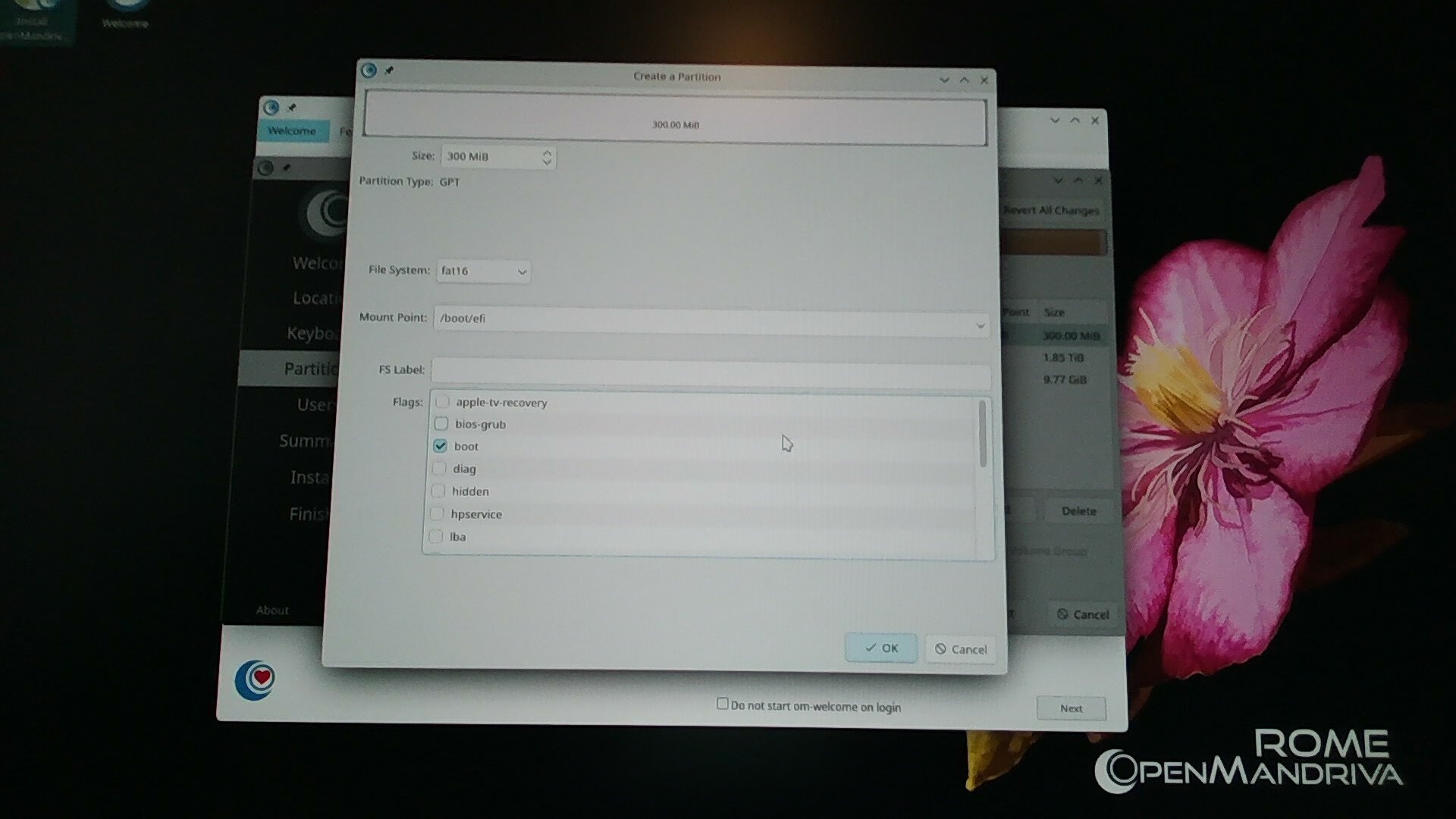
Another observation comes in here. I thought I remembered the first time I tried to install 4292, manual partitioning /*boot/*efi to Fat32 threw errors, and auto partitioning using the erase option automatically selected Fat16.

This sent me down another testing rabbit hole.
I will create another post below here with the results.

On my system, these two are grubx64.efi. My suspicion is some kind of backup when the kernel is updated. I had previously removed the one that said [GRUB] but it came back. @bero would probably know.

My guess on the blinky cursor is the wrong nvidia driver for your kernel. If you have that package, remove it, or disable it temporarily by editing the boot entry via the boot menu. nvidia.modeset=0 I think is the option that needs to be set. It may be set to 1.

I have just done a few more install tests but only up to the partitioning.
I think I might have found the source of the problem.

Summary

Installing using build 4292

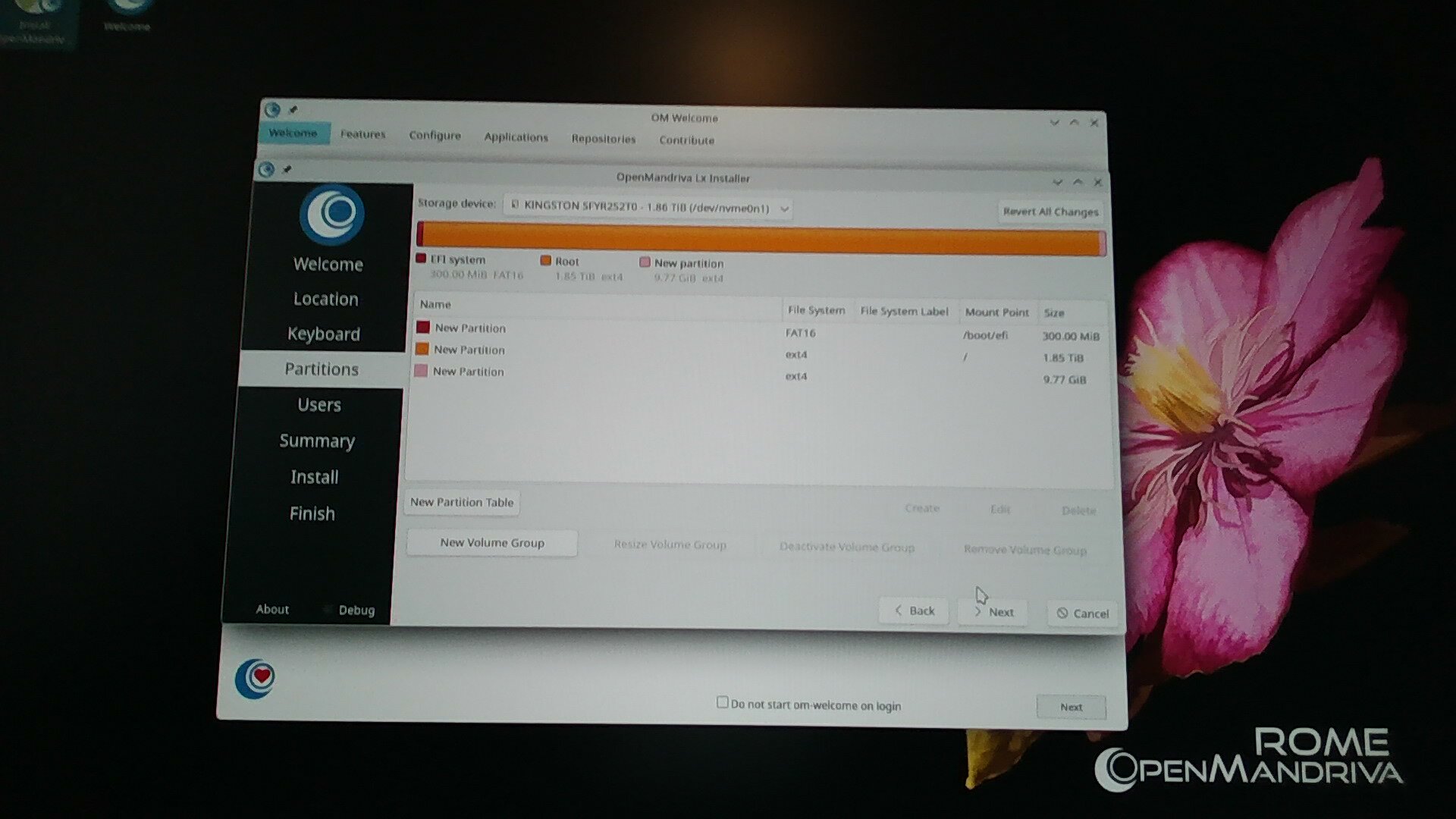
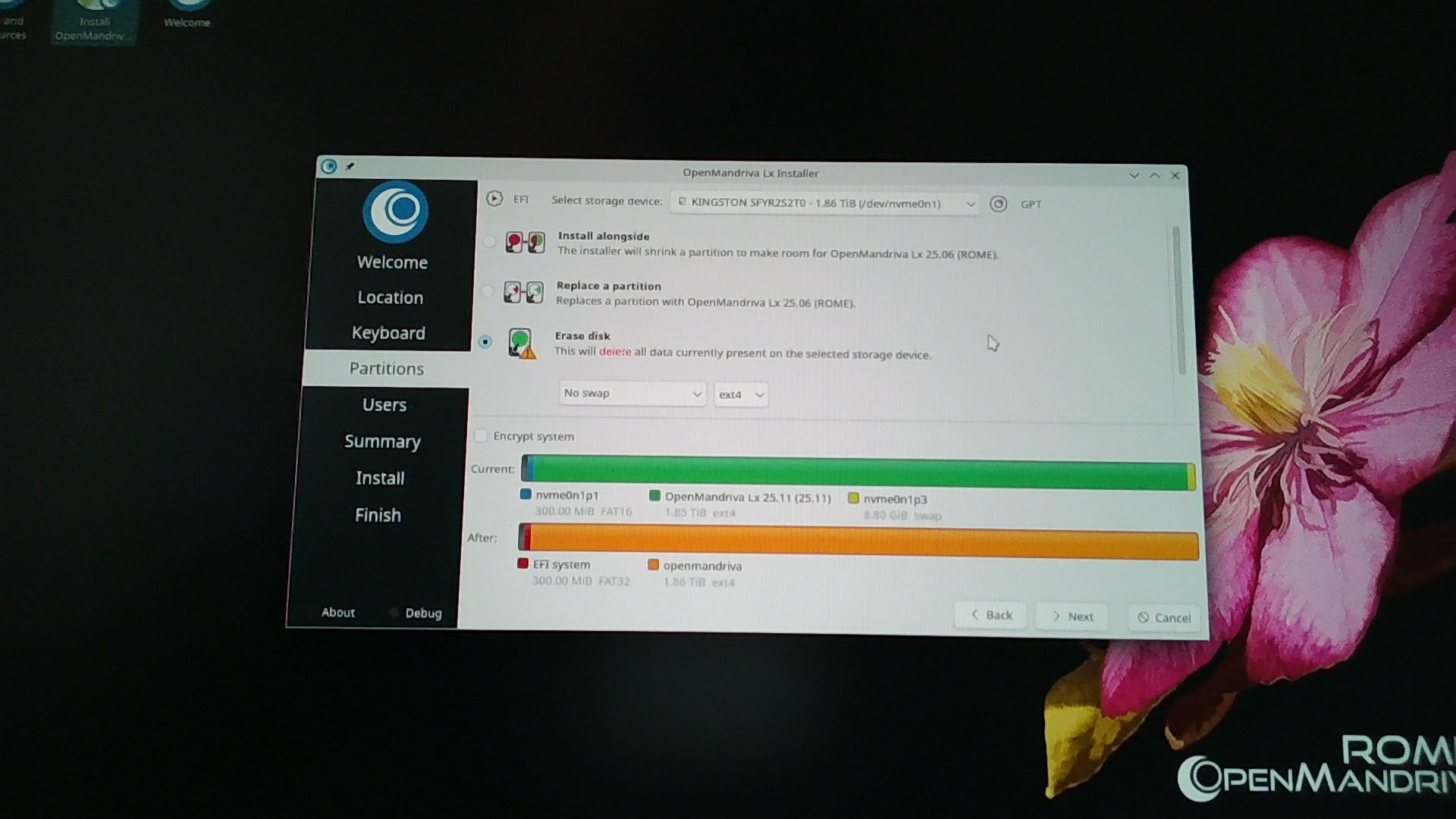
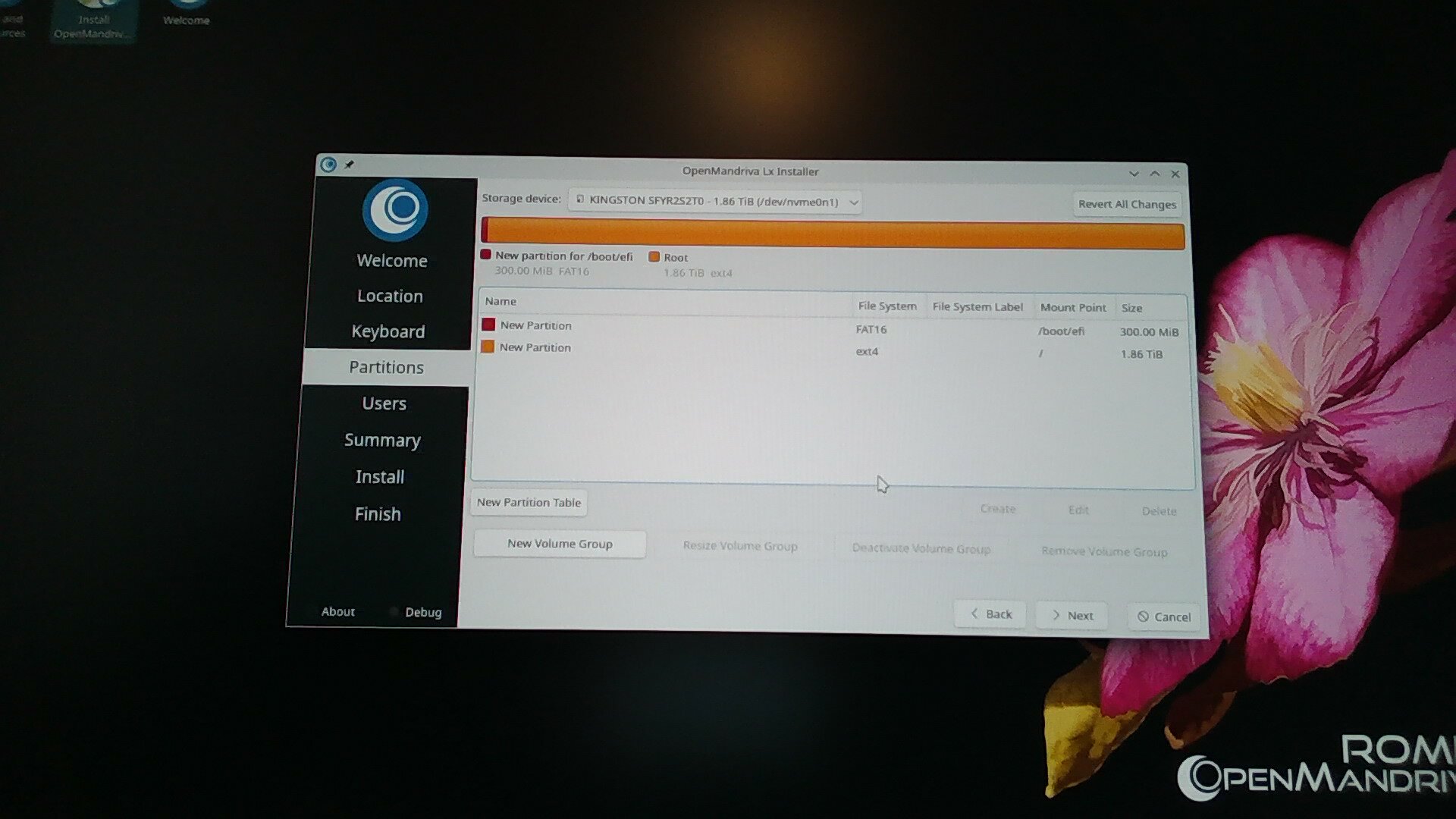
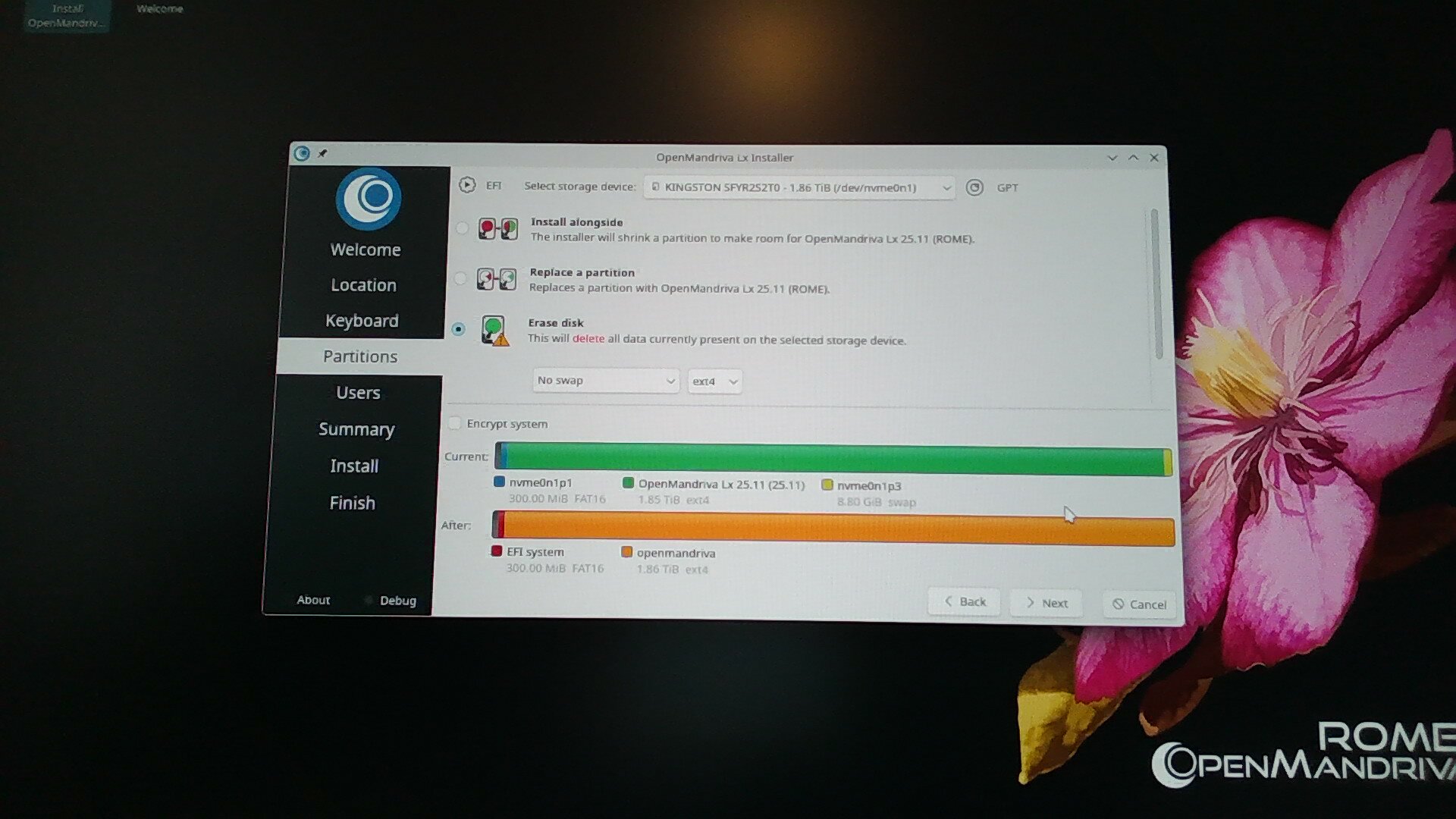
Auto partitioning (Erase option) automatically selects Fat16 for the /boot/efi partition.
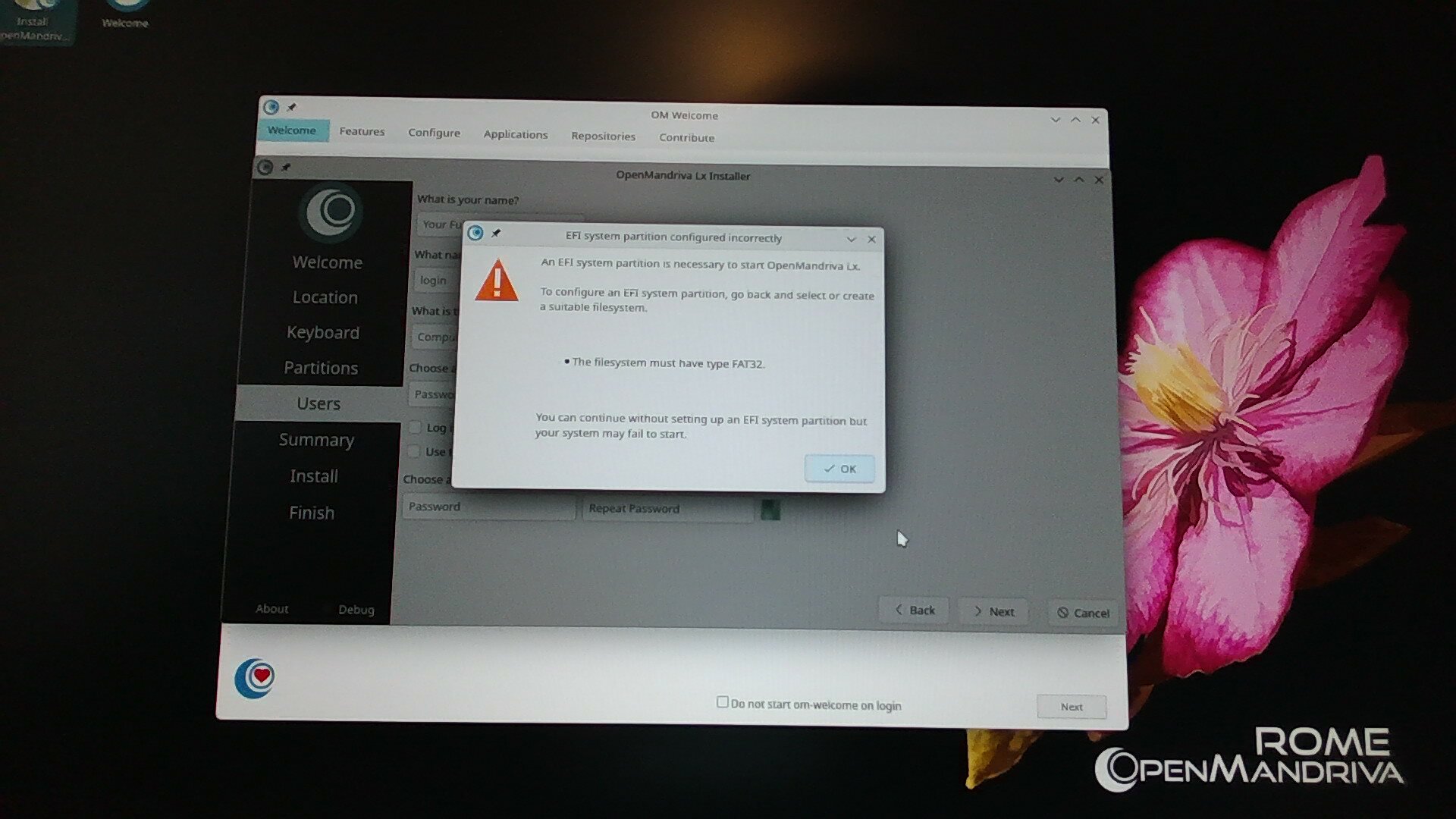
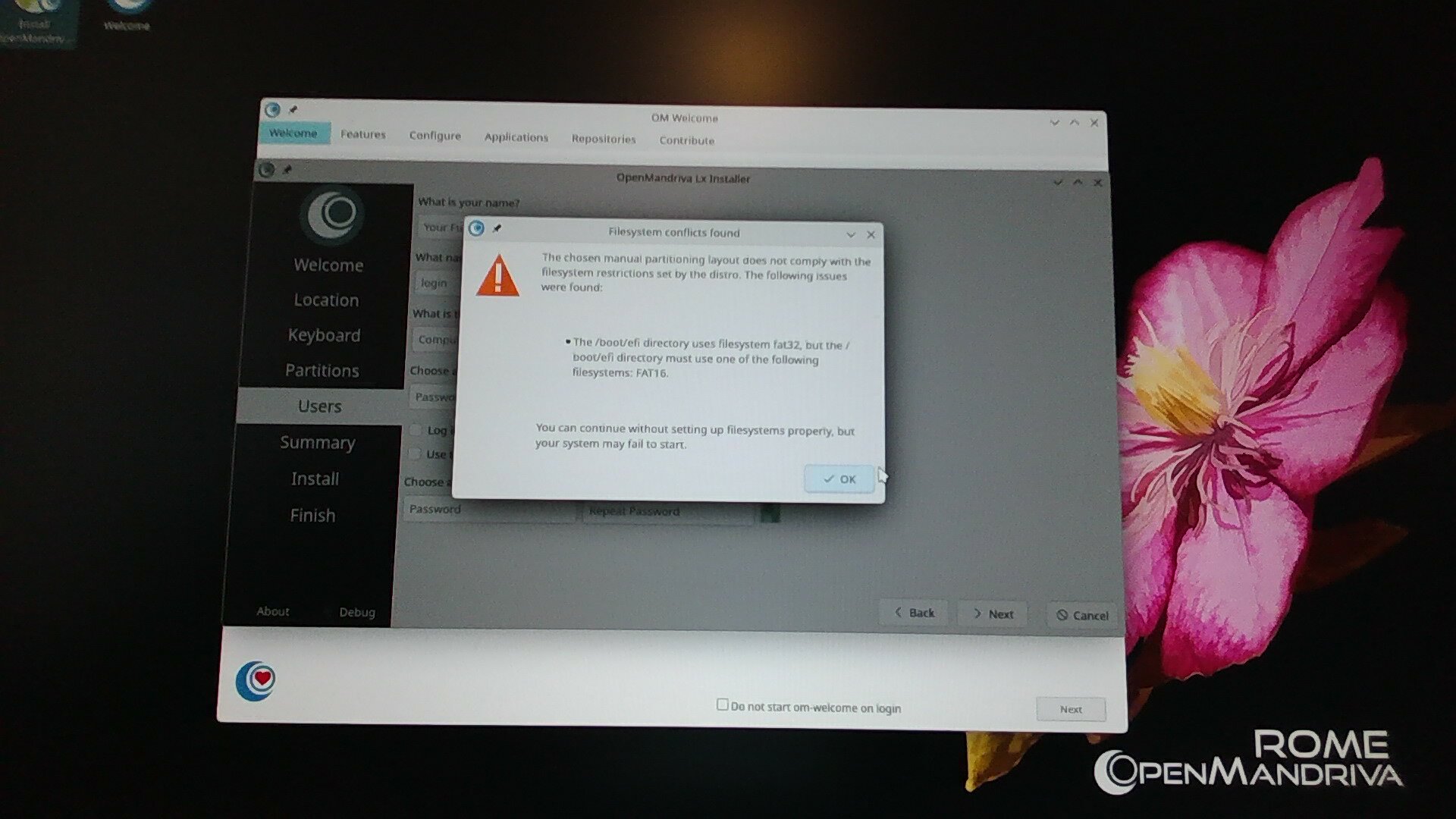
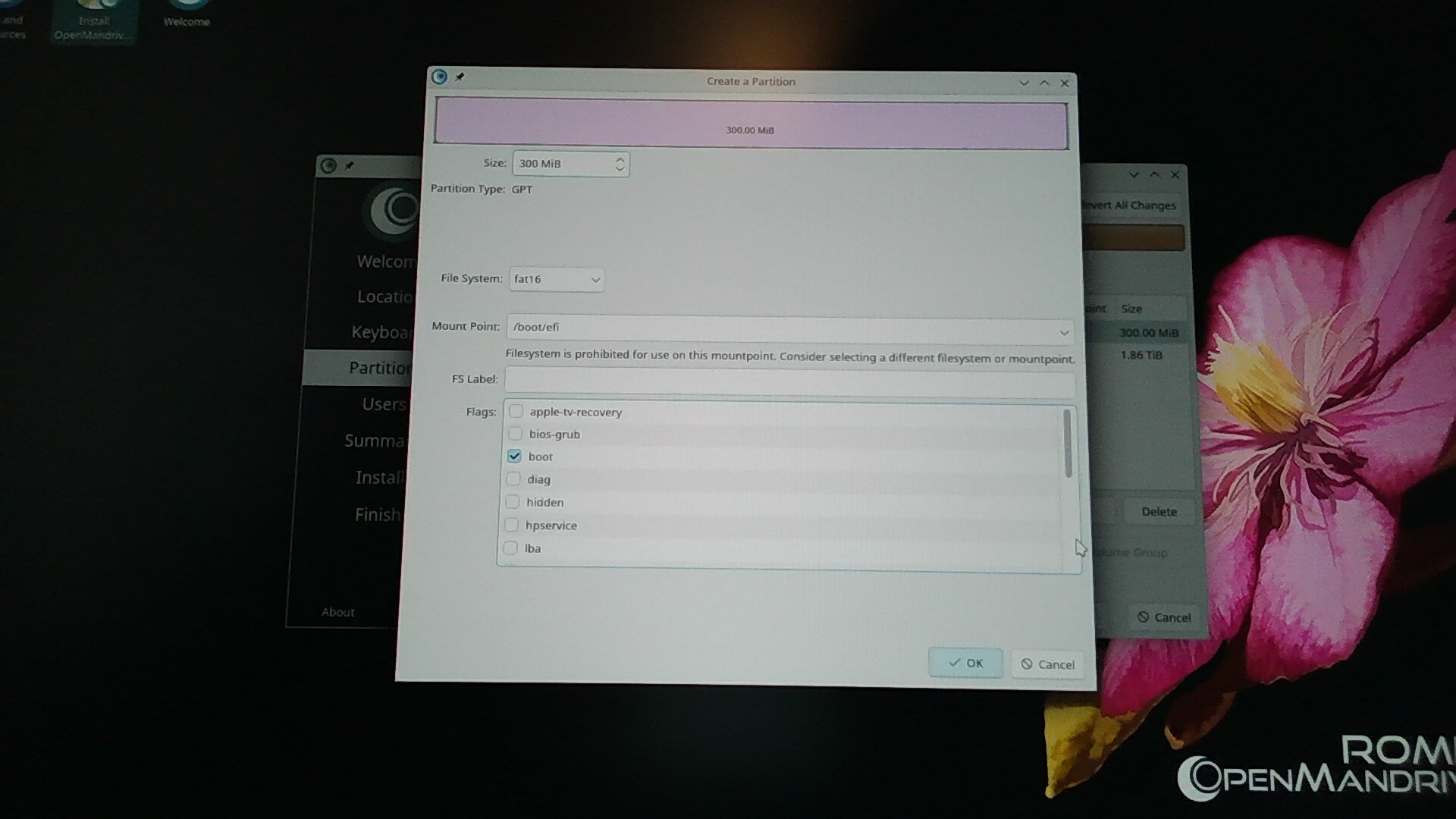
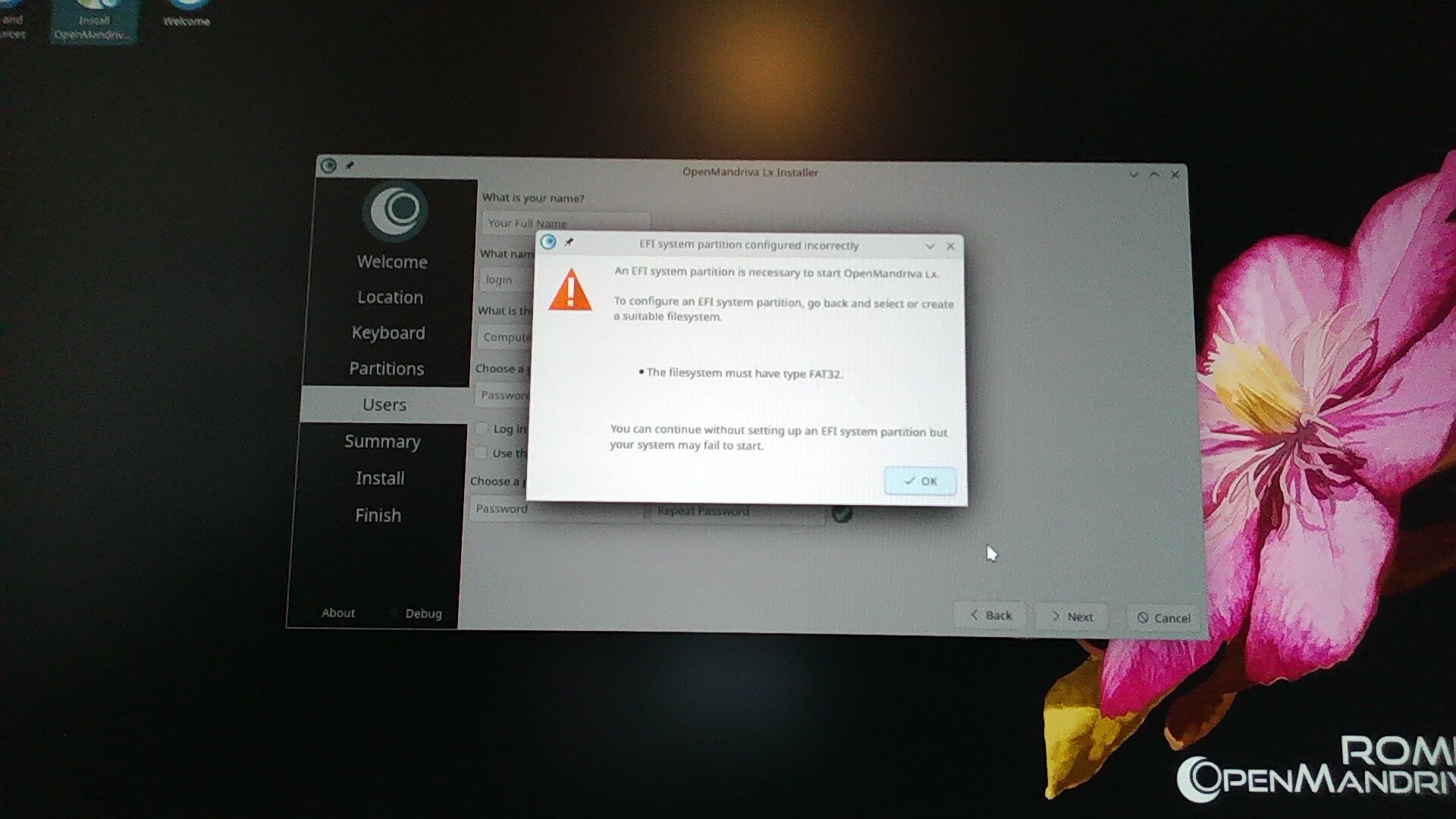
Manual partitioning, selecting Fat32 for /boot/efi throws contradictory errors
both “/boot/efi needs to be Fat16”
and “/boot/efi needs to be Fat32”
Manual partitioning, selecting Fat16 for /boot/efi throws no errors

Installing using build 4011 (which has had no problems for me)

Auto Partitioning (Erase option) automatically selects Fat32 for the /boot/efi partition
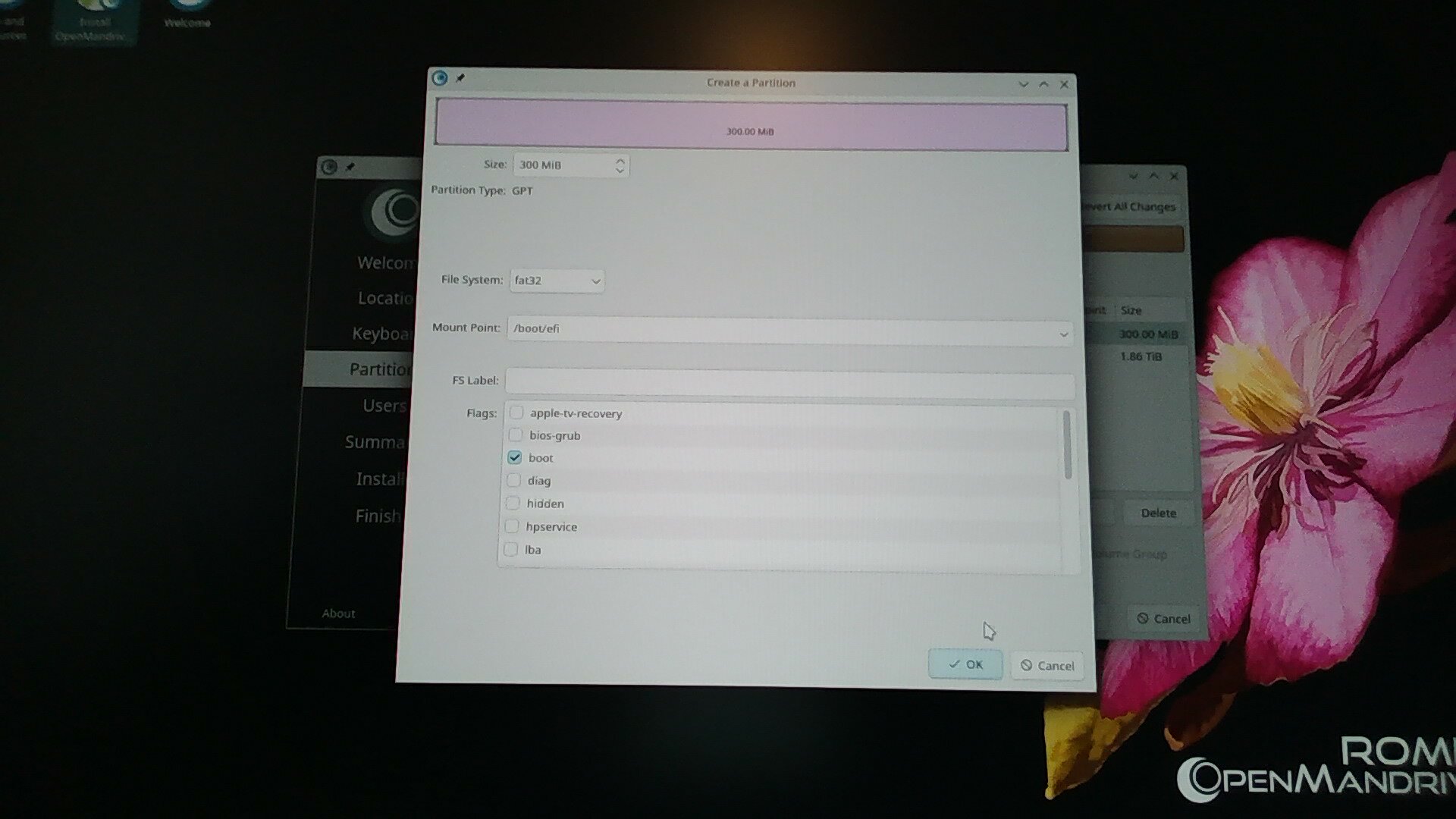
Manual partitioning, selecting Fat32 for /boot/efi throws no errors
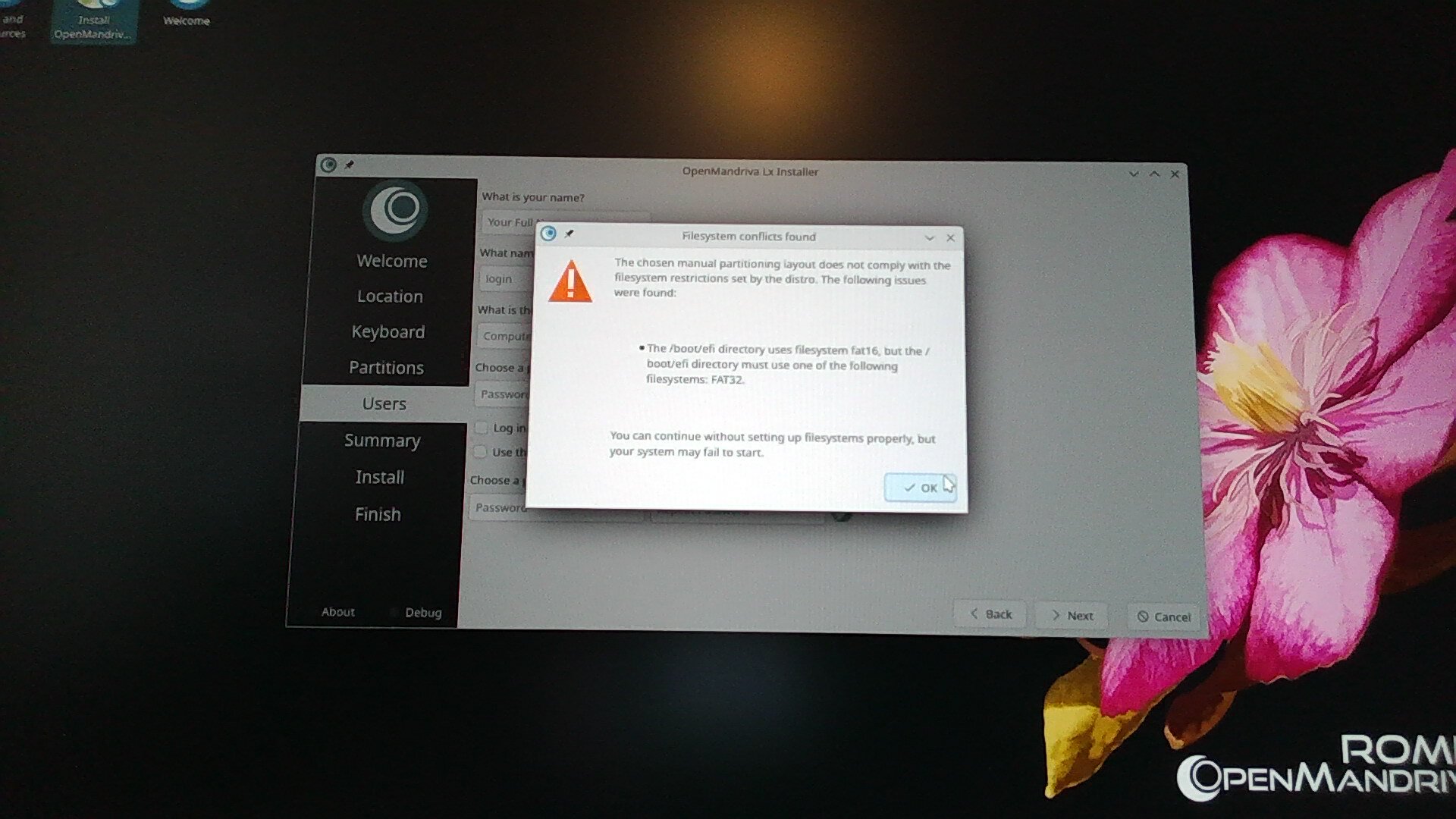
Manual partitioning, selecting Fat16 throws the same two errors as above only they both say the partition type must be Fat32

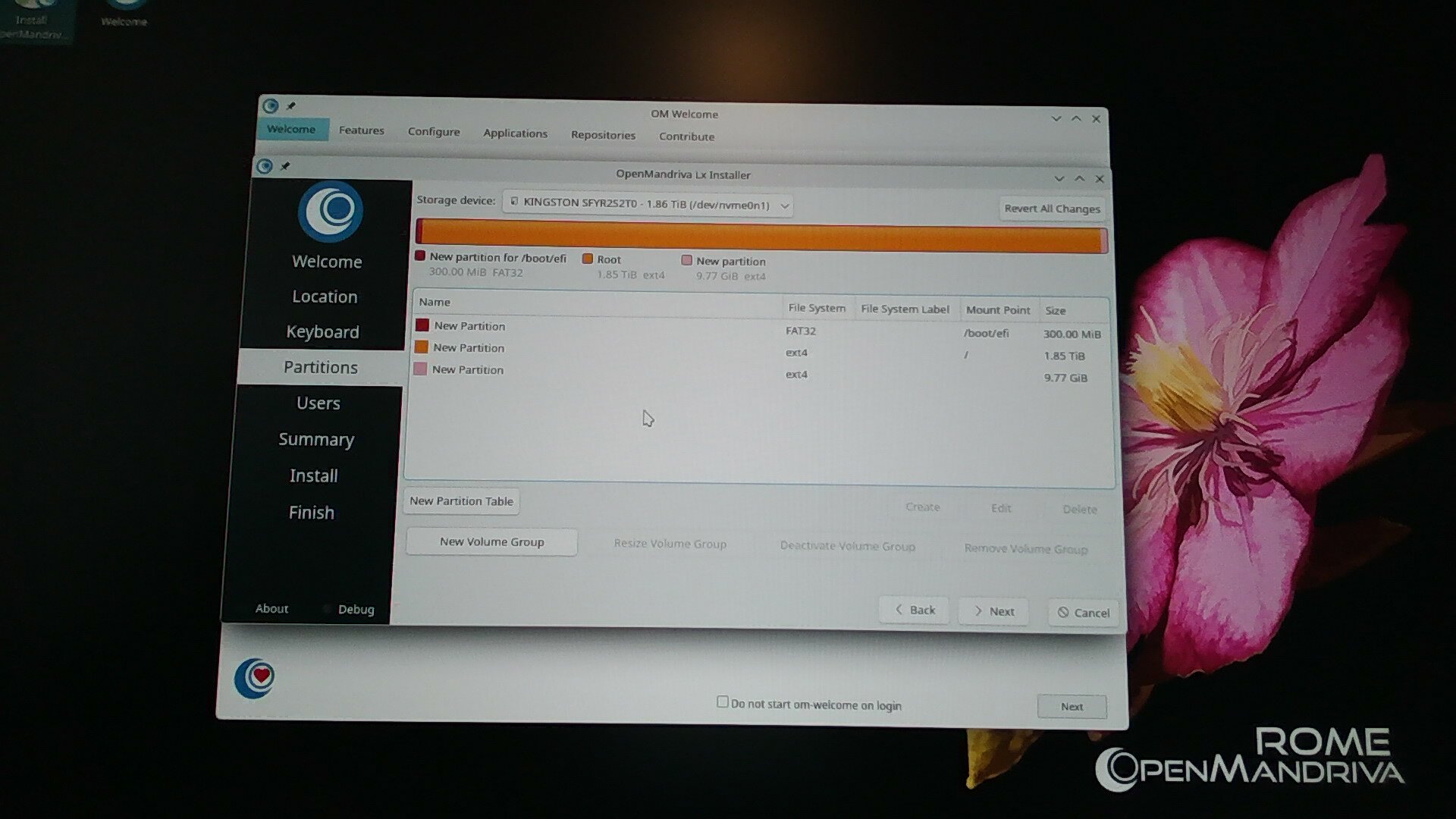
I was going to go into detail here , but the pictures mostly speak for themselves I think.

ROME Build 4292

Auto partitioning (Erase option)

Manual partitioning; Fat32 on /boot/efi

This gave the errors

Manual Partitioning Fat16 on /boot/efi

A picture of NO errors (lol)

Build 4011

Auto partition (Erase option)

Manual Partitioning

Fat16 on /boot/efi

Gave Errors

Manual partition; Fat32 on /boot/efi

And no errors

I hope all this is helpful.

EDIT:
It only just occurred to me to complete the install with build 4011 and check what /boot/efi entries are there (should have been obvious to do this)
I think I might do that now

EDIT2: (I meant to include this above but forgot)
My wildly uneducated guess, based on some assumptions, is something like…
Somehow, because the installer is making the /boot/efi partition Fat16, it is using the non 64bit .efi file from the USB but naming it with the “64”. The BIOS sees this as the correct .efi, so is booting from that .efi file, hence the “install OpenMandriva” shortcut persisting after installation. Meanwhile, the correct, actually 64bit .efi file is being saved but without the “64” in its name and so is being ignored.

This is all little better than speculation based on fragments of things not fully understood so is probably way off.

Either that would be weird, or I am about to learn something.

My system has no nvidia hardware, the only GPU in use currently is the integrated Radeon gpu on the R9 9950X3D
I would have thought any NVIDIA drivers installed would not be (active? in use?) at all and should have no impact on the system.

.

I have not done any updates on these test installations. Or are there updates that happen automatically during/after installing? (I do have network connected)

:backhand_index_pointing_up:

We don’t have auto updating. There is an application that is supposed to do it, but I have never seen it actually work. It could also be the nature of how we update that I have never seen it work. It just so happens that all the upstreams do releases when we are trying to update rolling.

I’m sorry @zeroability, I am confused by that.

Could a wrong NVIDIA driver cause this when I am not using NVIDIA?

Not unless you installed it.

Yep, and I have done literally nothing to the system after these installations other than grabing the journalctl and calamares logs etc.
So I guess I can’t blame NVIDIA this time? :frowning:

I’m blaming systemd. For some reason, it’s not cooperating with display managers. I had removed and installed one manually in a CLI session and it would not stop or restart the DM after install. I had to push the Reset button (which not many computers have anymore) because it wouldn’t reboot from the CLI, either..

I just had a thought.

What tty’s do the live OS from the USB ISO boot on compared to the full installation?

Ok, so the build 4011 installer / Live OS loads on tty1
the completed installation is on tty2, and tty1 is also nothing but Mr blinky, but it boots directly to tty2 (which 4292 does not)

4011 also has the three /boot/efi/EFI entries, with the same names, as 4292.
And the
/BOOT/bootx64.efi
and
OpenMandriva_Lx_[GRUB]/grubx64.efi
files are also exactly the same (same md5sum results)
And the same named ones are available on the boot menu and in the BIOS boot priorities as with 4292.
So all of that was irrelevant apparently.

I’m still wondering about the Fat16 being selected for /boot/efi on the 4292 installer instead of Fat32 though.
That wild speculation about the .efi files being mislabelled isn’t ruled out lol

I think I’ll try forcing /boot/efi to Fat32 using 4292 and see what happens.

I believe it’s on Ctrl + Alt + F2 in the live env. I don’t use it enough to be sure, though. On the DM I’m using (tdm) it’s Ctrl + Alt + F7. sddm is notorious for putting things where it wants to.

So forcing Fat32 on /boot/efi in build 4292 makes no difference.
BUT (and this is probably unrelated to Fat version)

When it boots to tty1 and Mr blinky, it actually switches to tty2 after ~30sec.

But now, it has

Logged me out after some time, or at least went to Mr blinky.

I logged back in, it went to Mr blinky, then it asked for log-in again.

I logged in again_> tty1_> mr blinky_> 30sec_> tty2 DE

Some time and it has logged out again (or at least black screen) only this time there is no response to anything. No mouse; k/b response and Ctrl+Alt+F1 _> F6 all leave me with Mr blinky.

I am thoroughly confused now.
In my ignorance I am still thinking that the installer wanting Fat16 for /boot is significant.
But all of this seems like some other stuff mentioned in the other threads, stuff which I had thought must be due to upgrading rather than fresh installation.
I’m gonna have to go back and read through all those other threads again I think.

Aside
I chose OMLx because you are small and independent team.
I chose ROME instead of ROCK because I wanted to learn.
I am getting what I signed up for (-:

But that sentiment is also at war with the desire to just install ROCK so I can put my shiny new PC through its paces lol

So just to check myself here

DM = Display Manager; This is what serves the GUI Log-In screen on booting.

DE = Desktop Environment; This is the GUI of the normal user space

Display Server = x11 or Wayland; there is a “compositor” that sits in here somewhere; This is what lets the kernel “talk to” the Display Manager and the Desktop Environment to allow user input to the GUI actually work.

Correct?

I’m asking because I’ve been doing some more testing to try to nail down these odd behaviours to replicability and want to be clear when I drop it in here.

I just hope at least some of this has been / will be actually useful and not just wasted forum space lol.

Right now I’m gonna have to call it a day, my cat is insisting on it.

:+1:

:+1:

Almost. Wayland is not a graphics “server” per se. It’s a container to run graphical things in. X11 is a server, because it allows remote connections to the graphics hardware directly. Now, most terminals are virtual (called VT’s) and are accessed from the PC with the Ctrl + Alt + F* series of shortcuts. Before, it was over a serial line and later ethernet.

The kernel talks to a driver module, that talks to the graphics provider/server thing, that additionally talks to Mesa or Vulkan, and then talks to your DE. Most of the GUI components need some sort of 2D/3D hardware rendering for creating the environment, widgets, and effects.