Saw this article being talked about on X and didn’t find anyone talking about it here.
Seeing as OM rolls out with KDE as it’s default, I’m wondering what this will mean for gamers because Steam/Proton uses X11 and what conflicts will occur for this? Also I’m personally anti-wayland. I’ve seen enough of it’s problems to not want it.
So my question is what’s in OM’s future on X11? Will it still be the default and what desktop UI will keep X11 support?
This really complicates the situation. I think many people feel cheated by KDE - This is not how you build trust, especially when the previous messages were completely different.
What should we do in this situation? I don’t know, but certainly, no decision will be made anytime soon. We’ll wait to see how things develop with KDE and then consider what to do. It’s still too early to judge.
Personally, I think there are several options:
comply with KDE’s wishes and have only Plasma with Wayland from 2026 or early 2027 (Our current Plasma on Wayland seems to be working quite well).
start focusing on other desktops that support the X session, such as XFCE or LXQt, etc.
create a fork of the Plasma, session and Kwin – which would obviously be the most difficult option and require significant investment of developer time, new contributors with the appropriate knowledge.
Regardless of what happens, a decision will be made after a thorough analysis of the situation, possible options, and available internal resources. The voice of our community will certainly influence the decision.
In my opinion, I think this will be the most productive use of our time. Even if that means we don’t fast track a release of the most recent version of Plasma for the foreseeable future. If they really think it will be a better product with Wayland, then it would be better to let that happen without our help or input. Decisions were certainly made without it, or the input of the larger user base.
There are still plenty of options that will continue to use X11, and there are projects smaller than KDE that are interested in supporting both. It’s not really about if KDE can do it, it’s they don’t want to. They have time and resources to start clout fights on the internet, and participate in social media trends and manufactured consent revenue streams for tech oligarchs, then they can assemble people to tackle the problem of more than one graphics server so users can have choices. We were told the sociopolitical activism efforts were bringing the best people to develop cutting edge software that doesn’t exclude people.
I’ve wanted to try LXQT but I haven’t found any proper installation instructions for an already established setup in KDE. I’ve tried Cinnamon and it just gives me a blank screen with desktop icons and no window boarders. Not sure how to resolve that issue either as documentation says it’s driver related which I know is not true in my case. I could reinstall with it but that means having to go through hours of customization, installs and the like. Bleh I say, BLEH.
Hi, Plasma 6.8 won’t arrive before 2027. Making decisions more than a year in advance requires a crystal ball. It’s best to wait until we know what the conditions will be and evaluate the best course of action.
As far as I know LXQt needs testers probably XFCE does as well.
For a very lightweight backup graphical desktop:
sudo dnf icewm
That one does come in handy at times. I add this to all my hardware installs. Hmmm… probably should start adding this to any VM’s I intend to keep around.
I would say the same is equally true as abandoning xlibre because there is more money being spent to attempt to develop and gaslight people about Wayland. People need more options than the two that currently turned their backs on users. It’s a better use of our time to make that happen.
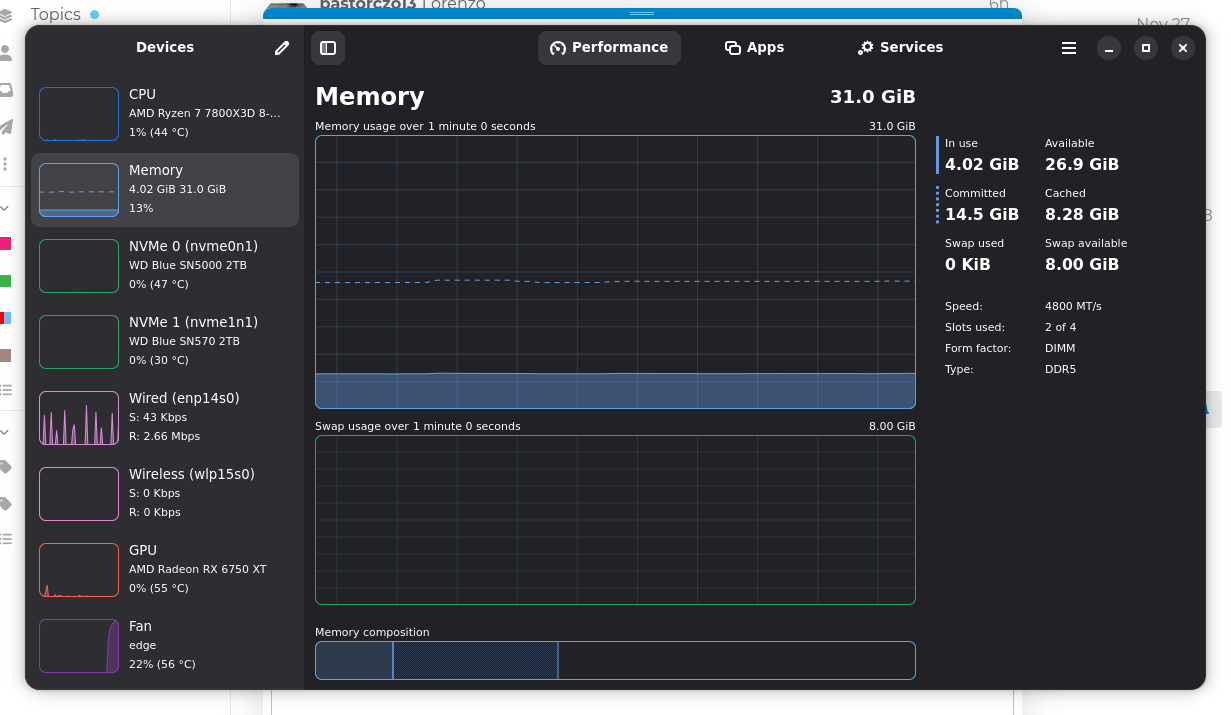
Those instructions actually worked. Took me a while to figure out how to put it in dark mode. Not as comprehensive but it’s super responsive and my system isn’t legacy old so that says something. Plus I like this monitor program so much better. It actually shows my GPU and my resource usage is much lower which boosted my FPS in Palworld by 18 FPS average.
It’s GSkill AMD Expo 6000mt RAM. However my motherboard has a fault which MSI tried to correct with a BIOS update, it only partially worked and they are working on it, but so far only alpha releases some said bricked their boards. The problem is that if you enable A-XMP, the motherboard will fail to power cycle on restart and the system will hang on initial power. It will shut down completely, but wont power cycle on a restart. To fix this power cycle issue, they recommend disabling A-XMP until the issue can be resolved and it does work. So if I click restart system, or type reboot in terminal, system will reboot like normal, however the downside is instead of 6000mt, I use 4800mt of it. However I noticed something, the difference is not much for the tasks I use my computer for. It doesn’t effect me so I haven’t been particularly worried about it. It’s only a slower speed, but still functions with all of it’s abilities. All in all, I really don’t care at this point. MSI already sent me a non expiring coupon for the cost of my board so I can purchase a replacement at my convenience. No expatriation date on it so I am in no hurry.
I have a AMD B450 chipset based MSI mobo with similar problems. Have to shut off, pull power cord, press power button, plug cord back in and power on. NEVER AGAIN will buy MSI mobo’s!
Thanks so much for sharing this Golem! Indeed interesting. Someday Wayland will be ready, in the meantime hackers are stepping up to keep millions of devices useful and not abandoned.. Good to see.
Regarding alternative DE/WM, a nicely themed xfce can still be highly productive. The xfce devs have committed to a dual development strategy, X11 continues while Wayland development operates separate. This seems a very sensible idea.
Mate development appears to have ground to a halt which is a great shame as it still remains the most feature complete alternative.
Lxqt is working on Wayland support but his appears to be at the expense of X11 support going forward (someone correct me if wrong). Less feature complete than xfce, distro spins borrow bits of xfce to add missing bits.
One of the reasons I came to check out OM is because it appears to have up to date Enlightenment in its repo’s. I get that opinions are polarised on this WM but I rather like its light fast GUI … will be looking at trying it out from the Rome repo in the near future.
My plan is to stick with X11 for a further 2 years unless Wayland suddenly drastically improves…
@kLF There are Cooker and ROME LXQt isos here. I do not test these normally. But I have booted them on hardware and checked that the Calamares installer starts and looks to be working OK. I did notice that not everything in the Configuration Center is working but that probably applies to an installed LXQt desktop. You do have to scroll through the list to find what you want.
I would consider the OMLx LXQt effort to be alpha or beta level. It needs more testers and developer time.