[I] I have [Searched] the forum for my issue and found nothing related or helpful
[I] I have checked the [Resources category ] ([Resources Index]
[I] I have reviewed the [Wiki] for relevant information
[I] I have read the the [Release Notes and Errata]
OpenMandriva Lx version:
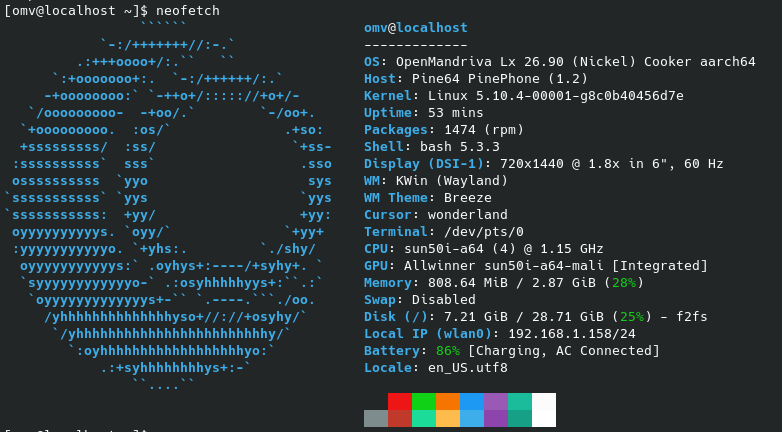
OpenMandriva Lx release 26.90 (Nickel) Cooker for aarch64
Running on a Pinephone Explorer Edition
Desktop environment (KDE, LXQT…):
KDE Plasma Mobile
Description of the issue (screenshots if relevant):
I downloaded the Pinephone image for Openmandriva (following the link on the Pine64 wiki).
The initial install worked, although I had to manually resize the partition to use the full storage available. I have then been running into countless issues:
When trying to upgrade the Rolling system with the command $ sudo dnf clean all ; sudo dnf --allowerasing distro-sync (as found in [openmandriva main website domain]+en/news/article/openmandriva-lx-4-3-rc-available-for-testing)
I firstly had to do sudo rpm -ivh --force --nodeps /var/cache/dnf/cooker-aarch64-/packages/[conflicting package name].rpm commands on various packages.
Once that had been done and the upgrade ran, it broke dbus since the old version was using dbus-daemon but the new one was using dbus-broker, but it failed to automatically activate the new way.
Once I managed to get back in (had to mount using Towboot and manually fix dbus) the UI wasn’t loading. I needed to reinstall SCCM and plasma-mobile, then config so it uses the mobile UI by default.
The issue now is the UI runs like molasses, and I believe its down to there not being a 6.x kernel available for the Pinephone- its still stuck on 5.10.4. As such, I cannot get the ‘panfrost’ graphics module to run since all these modules now expect the new kernel following the dpm update. This means its rendering the UI with the CPU.
Trying ‘sudo dnf install kernel-pinephone kernel-pinephone-modules-extra’ returns ‘nothing to do’, which makes me think there isn’t a Pinephone kernel available for 6.x.
Relevant informations (hardware involved, software version, logs or output…):
Just tried that
($ sudo dnf clean all ; dnf clean all ; dnf repolist $ sudo dnf distro-sync --refresh --allowerasing)
It updated a few packages but still no dice with the kernel.
When I try sudo dnf reinstall kernel-pinephone kernel-firmware-pinephone it returns Packages for argument ‘kernel-pinephone’ installed, but not available.
I’m moving this to Development > Development Testing since it’s out of scope for Support. Mobile installs might not be as up to date as the desktop ones. @bero should be able to assist with that. Thanks for your patience.
Just some preliminary things, you will want to be in the Cooker chat channel and monitoring ABF for what builds are taking place if you are using a Cooker release:
Cooker is where all our dev/testing takes place, and you would therefore be a tester.
There were some package renames that would require the GUI session be logged out and the dsync take place in a TUI. Otherwise sddm stops the GUI session and that terminates the dsync process. This is something that has been reported in the forum with desktops and would more than likely affect mobile devices, as well. Those announcements typically get posted and pinned in Support or Announcements and Communications.
sonic-mobile-interface is on the github org for sonicde feel free to give this a shot on pinephone im pretty sure aarch64 is built for sonic-win and sonic-workspace if you would like to try!
I’ve since stuck a different distro on as wasn’t getting much success. It’d be useful to have a more up to date img to use before I try again- I discussed it on the Cooker chat channel and not sure its worth the effort for the devs to compile though. Sounds like I’m one of the only ones trying to run Openmandriva on the Pinephone nowadays.
if you wanna give testing a shot later. i would love to try and help you get it setup I am trying to root a oneplus 8T to install openmandriva on with the aarch64 build it should have similar setup process
from what it looks like i need to apply kernel patches to cooker kernel for pinephone its upgrading from 5.10 to 6.19.3 and its got all the wrong flags for that target device let me read the docs for this more
codeberg dot org /megi/linux cant share links. looks like they have multiple chipset types here we could just try building that under openmandriva with our .config file and see how it goes as a stopgap for right now. i see pinetab and other a64 branches here
I couldn’t get a kernel higher than 5.10.4, when I ran ‘sudo dnf install kernel-pinephone kernel-pinephone-modules-extra’ it returned ‘nothing to do’.
Trying to reinstall the existing kernel with sudo dnf reinstall kernel-pinephone kernel-firmware-pinephone gave the error Packages for argument ‘kernel-pinephone’ installed, but not available.
Guess the only way around that is manually compiling a newer kernel?
I managed to brick the last install by trying to use the generic 6.19.0 kernel.
Let me take a look at that kernel-pinephone spec file and see if i can make it build for a newer kernel version pinephone-tools i see this first of all but thats not the kernel
github dot com torvalds/linux/blob/master/arch/arm64/boot/dts/allwinner/sun50i-a64-pinephone.dtsi seems to have our missing kernel file you need to add for building the omv kernel from source linux-sunxi dot org /PinePhone add that to this git clone github dot com /OpenMandrivaAssociation/kernel.git omv-kernel
cd omv-kernel
git checkout master
cd ..
it should have a defconfig if not you might need to pull that from the torvalds or megi kernel tree also /arch/arm64/configs/pinephone_defconfig
make ARCH=arm64 pinephone_defconfig
make -j$(nproc) Image dtbs modules
I’ve tried again- have got to the part where I’m trying to cross-compile the kernel.
Downloaded the Github OpenMandrivaAssociation/kernel to omv-kernel, and got the Megi pinephone_defconfig file (codeberg org /megi/linux/src/branch/orange-pi-6.19/arch/arm64/configs/pinephone_defconfig).
Issue is I couldn’t see a ‘Makefile’ anywhere. After checking with AI, it seems like the omv-kernel is comprised of .patch and .fragment files rather than the actual kernel source code.
I then decided to download the standard Linux kernel and use that with the pinephone_defconfig file. However, when I copied across and installed the modules from it and rebooted, it gave a kernel panic: ‘kernel panic - not syncing: requested init /sbin/init failed (error -2)’.
Seems like the issue now is its expecting an initrd.img file but one doesn’t exist.
I then tried mounting the Pinephone again with Towboot and trying to create an initrd, but got chroot errors.
At that point things got so complicated I got lost (was trying to find a pine_mods directory but had no idea where that was).