Alright so I’ve been using Linux for at least one year and there isn’t any dual booting going on. I actually erased Windows and re partitioned my other m.2 SSD for backup.
I haven’t stayed on one particular distro this whole time. Tried out many and here is my thoughts on each I’ve tried. Special note though is that although I can do the complicated stuff if I have instructions or know what I’m looking for, but damn it I just need the OS to work. I’m not willing to put up with anything more then minor inconvenience.
Linux Mint: Seriously outdated packages, lots of broken apps and not a single appimage (Webkit) would load even with permissions to run as a program. Seems to have the same failure rate as Ubuntu and seeing as they are the same on the back end, makes sense.
Ubuntu: Same issues as Mint but even more outdated. Everything was at least 2 years out of date if not more for other stuff. Absolutely no bare minimum of library files ready to go for basic apps. It was a constant fight to track down each missing dependency just to find out it’s out of date and doesn’t work without changing to a different repo for latest just for the new versions to some how break other apps that ran without it’s older version previously. Abysmal Dog Crap OS and it’s bloated to all hell with stuff I never used or would.
Zorin: Tried too hard to be Windows. Lacks basic dependencies and only looks the part on the surface but everything after is a constant hunt for everything you try to install. Screw that.
Fedora: What on freaking earth compelled someone to make this? Sorry the list of wrong on this goes far long. I’m not even going to bother with typing that wall of text.
Debian: 2010 called and they want their distro back.
Arch: After hours of frustration of why things randomly broke I was reminded of a song “Everything is Broken”.
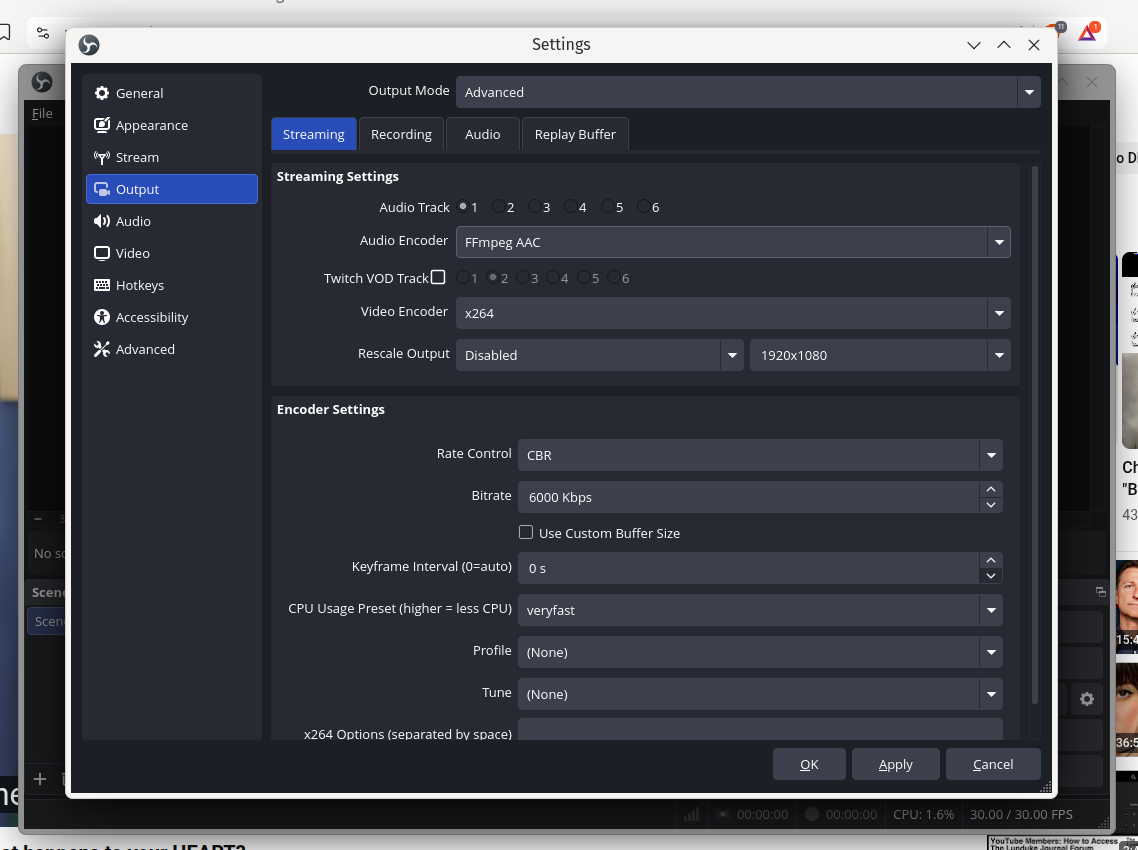
OpenMandriva: Everything just worked for the most part anyways. I had a few hiccups with KDE Wallet causing crashes that locked up my screen for some reason but was still running… znver1 version fixed that issue somehow? I never got a solid answer as to what was causing it. But the znver1 version runs solid with no issues. Only issue I have is lack of hardware encoding for AMD graphics being available for OBS etc… However not sure it’s OS related or not as I did install the codecs so “shrugs”, I never got that far with testing OBS on the other distros, other more basic usage issues occurred before I got that far. Software encoding only uses 3% of my CPU anyways so it’s not much of an issue on a AMD 7800X3D.
So yeah, I’ve stuck with OpenMandriva sense end of July up to the date of this post and I don’t see a reason to try any other distro now. It’s working and I only had to use terminal once to install that OpenRGB app hardware profile SH thing. Seriously I’ve had grease with more friction on my car’s axle diff then I had using OM.
The only things that confuse me is the Microsoft Edge browser installer being listed in the welcome menu. I laughed at that sense it seemed a joke.
My daily use is surfing Youtube, using OpenOffice Calc for some spreed sheet nonsense for work and mostly playing games on steam. I’m a simple person and like simple things. I gave up the advanced computer user crap in 2008. I’ve been pretty lazy after that.
Hey! I am happy to hear OMV worked great for you! I always switch distros but I find myself staying more and more in Openmandriva. It’s like one or two things that I need that I still cannot do here, but otherwise, I am good!
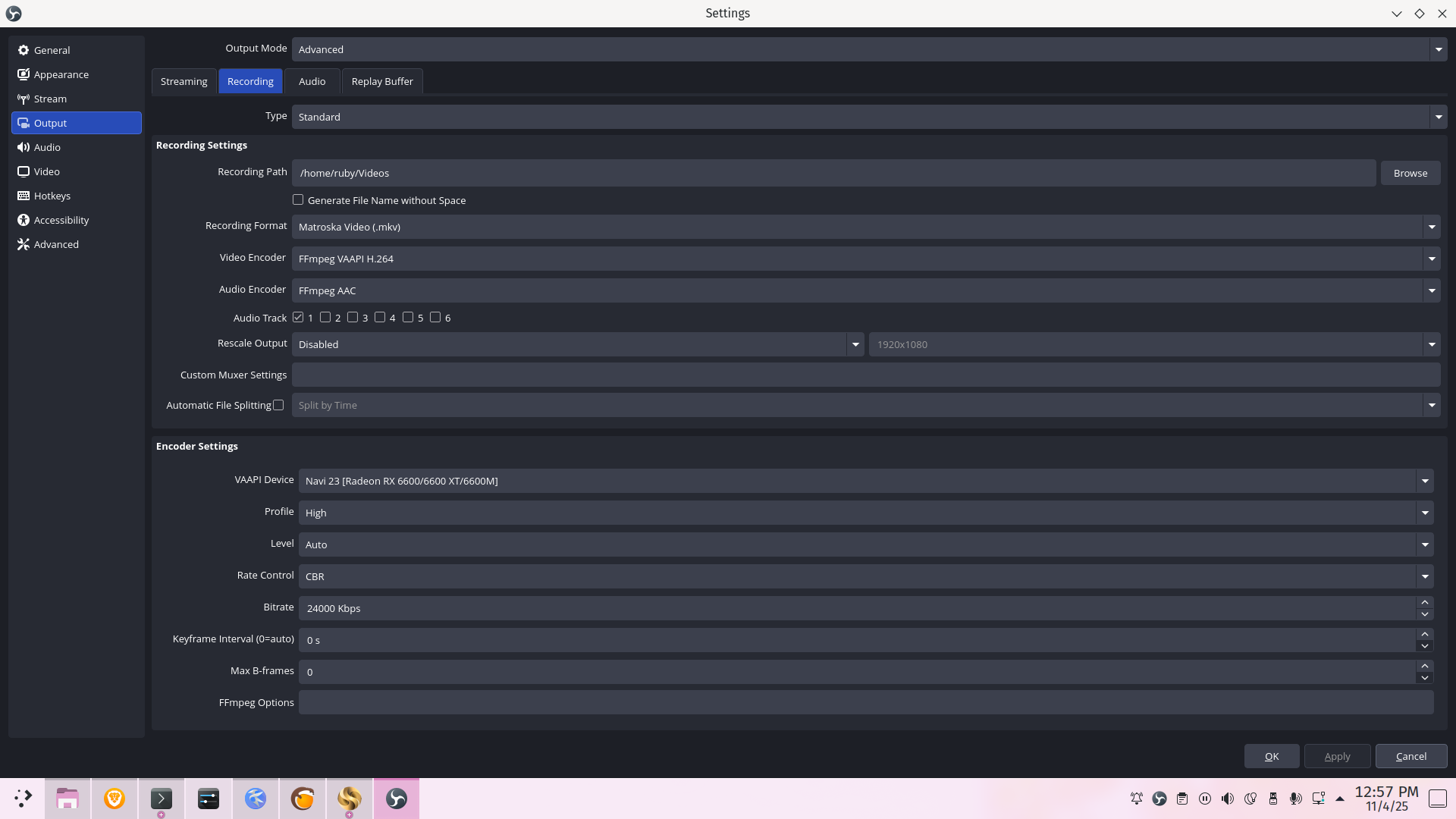
Have you checked this on OBS, though? I have a 6600, which supposedly cannot be used for hardware encoding, but if I use this, it does use my card indeed for encoding, leaving my CPU free for other tasks. You need the advanced tab to use ffmpeg vaapi, which means it will use your gpu.
Hey! I used to stream on Twitch, now probably only gonna do that on Youtube, download the video and split into recordings if necessary with Shotcut.
What could I help with? I usually just use the default settings and the recommended bitrate from the streaming service. Flatpak OBS usually does this setup for me when it asks in the wizard where I’m gonna stream to.
In terms of recording, depending on your resolution you need to increase bitrate for it.
12,000 KBPS for just recording the screen with not too much stuff moving is sufficient. It is ‘okay’ for games that do move a lot. For streaming games where the pixels change a lot (the camera moves often and scenery changes a lot), you need more bitrate. Problem is, they kinda limit the bitrate for streaming, but that isn’t a problem when recording. I usually like to do 12, 24, 48 Mbps and things like that. Around 48 it is visually lossless.
I try for a preset that uses either little CPU or I lower bitrate with near default settings. I’d use something like this to record a game. In fact, I’ll try that right now and see how it looks. Been forever since I recorded anything.
If you need to optimize to the max the recordings, try recording with high bitrate on H264 then remix to half as much bitrate on HEVC/H265 offline. Got great results with that both in size and quality in the past.
Thanks for sharing, I hated Ubuntu as well. I actually like Debian a lot as it is now, but they are not headed in a good direction IMO so I came over here instead.
It is interesting how you complained about out of date packages with the top distros. Since Ive only used Rome ever as my distro I didnt even know this was a thing with Linux. Even comparing with flatpacks I havent seen any packages that were more than one version behind on OM.
My internet speeds allow me to go significantly higher then those settings.
I have 1gbs for both download and upload speed on fiber.
Rumble says I should use 6000 bit rate for max quality for 1080p.
Sadly no hardware options show up in video encoding, just software (CPU) encoders.
I did go back into bios and enable the onboard graphics 7800X3D, but that causes some strange visual issues with some app windows like corrupted pixels as long as I’m plugged into my 6750XT, but if I disable the onboard graphics it goes away. One thing it does do while enabled is enabling access to hardware encoders in OBS. Either I navigate some apps looking like corrupted images to use it or I use software encoders with no corrupted images.
For example, HELP and WELCOME screen do this on the extreme end. But I got other apps from flatpak that also do this and one appimage called curseforge.
SO yeah I keep onboard graphics disabled in bios to fix this, but the trade off is no hardware encoders being available.
I duplicated this problem with regular OM install ISO (not nver1) on a much older computer that sports some legacy bios, but has an AMD 380G on a Phenom II 1055T. Onboard video being enabled does the same corrupted pixels thing if you are using the discrete graphics card. So I’m assuming this is an issue with Xorg. Also the encoder problem is the same, there when onboard is on, gone when disabled. Two computers each somewhere around 16 years apart in hardware and both with the same issue.
Because I duplicated this issue, I just assumed it’s something broken with OBS, Xorg or the driver, but I found out they don’t use the same driver so that can’t be it.
I also followed tutorials online for manually installing the encoders for OBS to use, even properly linked them from a separate folder as to not mess with the original files. So yeah I got links in the right places and they are working and OBS does access them, but nothing shows up in the video encoder options under advanced. I also tried both OM repo install and flatpak install, with codecs installed from OM welcome screen link.
Now I did try one thing that broke the driver on my main computer and I updated it from cooker repo and OBS then works with hardware encoders, however I couldn’t start Xorg after reboot. I have a removable SSD that I tested that with instead of my main install so I didn’t screw up my main install.
Really though, this. Considering the size and funding of some of the distros, you wonder what tf they do with their workdays. How can better financially equipped mega distros push such old packages? How the mighty have fallen.
I understand. It is just that the services limit how much bitrate they take in to really low levels, for streaming, that is. For recording, you could go lossless.
I don’t understand why you don’t get it to show to you in advanced tab while I have an inferior card and yet for me it does show, both flatpak and not. I hope you find a solution or at least an explanation. Also, really weird the integrated GPU is causing those artifacts. That isn’t normal. My cpu however is a 5600, no integrated graphics, so perhaps that is the key to understanding this?