Hi,
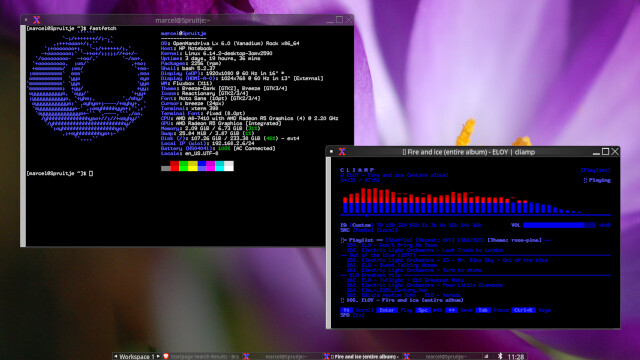
I have a succesfull Fluxbox install with ROCK as base.
Here some directions to get started.
I’m assuming you’ve installed OpenMandriva and that you have some experience working with Linux distributions and the terminal.
Installation
Open a terminal console or xterm and install the following packages:
- fluxbox, the window manager,
- blueman, not included by default with KDE Plasma and required to manage your Bluetooth devices,
- pavucontrol, an audio mixer for configuring sound,
- feh, for changing your desktop background,
- lightdm, a login manager for logging into fluxbox,
- lxappearance, a manager for changing GTK themes
- xrandr to configure your monitor settings
You can use dnfdrake to search for and install the packages, or use the terminal. Note that some packages require the extras repository.
$ sudo dnf install fluxbox blueman pavucontrol feh lxappearance lightdm xrandr
(enter password)
Openbox is automatically included with lxappearance. You can remove it separately afterward.
$ sudo dnf remove openbox
Configuration
After installing the packages, you may choose to keep KDE Plasma as a backup. In that case, it’s best to configure sddm so that you can log in to Fluxbox from that login manager (the default OpenMandriva login manager). Make sure you have the fluxbox.desktop file in your /usr/share/xsessions dir so you can select the Fluxbox session.
If you choose to remove Plasma, it’s best to make sure you’re logged into Fluxbox first.
sddm will break and will not be start on reboot.
Only then should you remove Plasma, which you can do with the following:
$ sudo dnf remove plasma*
(enter password)
$ sudo dnf remove sddm
$ sudo systemctl enable lightdm
After this, if you log out via the menu → exit, you may end up in an xsession.
Restart with $ shutdown -r now and to reboot.
The lightdm screen will show up.
After you’re logged in and are looking around in the Fluxbox window manager.
Click on the right mouse button to access the Fluxbox menu.
You have to manually add the applications you want.
Open an editor and modify the menu file ( /home//.fluxbox/ ).
In the .fluxbox dir you also find the startup file that you can modify to add icons/applets for the systemtray.
Background can be copied to the backgrounds dir in the .fluxbox dir.
Add
[submenu] (Achtergrond)
[wallpapers] (~/.fluxbox/backgrounds) {feh --bg-scale --no-xinerama }
[end]
to the menu file, after that you can select the background via the Fluxbox menu.
Todo
I’m also still working on organizing GTK themes, the volume icon, and the battery applet for the system tray. I’m sure I’ll figure it out :).
Any tips on how to get pavucontrol and a battery icon in the system tray are welcome.
Result